


Seattle Dev

Workflow Automation Seattle

Ship custom workflow automation that connects your tools and removes busywork. Built for Seattle and Washington teams tired of people-as-integration.
Two colleagues mapping a repeatable workflow on a tablet in a modern office

If it happens every week in an inbox, it can be a system.

How we start

Connect, write a plan, then stay in the work

You are not hiring a vendor who vanishes after a kickoff. You get us as an embedded partner who learns the business, then ships against the plan.

01

Connect

Thirty minutes. We learn how the business actually runs: who buys, what is broken, what a good month looks like after launch.

02

Write a plan

What to build, what to skip, an honest range, and whether we are the right fit. You leave with a path, not a pitch deck.

03

Embed

You work with the people who ship it. We stay in the work after launch so the site does not rot the week after deploy.

Automation That Matches How You Work

I map the real process: exceptions included: then automate the reliable path and design human checkpoints where judgment still matters.

End-to-End Process Automation

From lead capture to fulfillment, invoice to reconciliation, automations that span systems instead of living inside one SaaS silo.

System-to-System Sync

CRM, accounting, support, inventory, and custom apps kept consistent with APIs, queues, and clear error handling.

Document & Approval Flows

Route contracts, onboarding packets, and internal requests with audit trails: no more “who has the latest PDF?”

Alerts & Exception Handling

When automation fails, the right person gets context, not a silent broken sync you discover weeks later.

AI Where It Earns Its Keep

Classification, extraction, and drafting inside workflows, paired with rules and review. See our AI specialist practice when models are the bottleneck.

Built With Seattle Teams

Local discovery workshops, Pacific-hours delivery, and automation ownership your staff can understand.

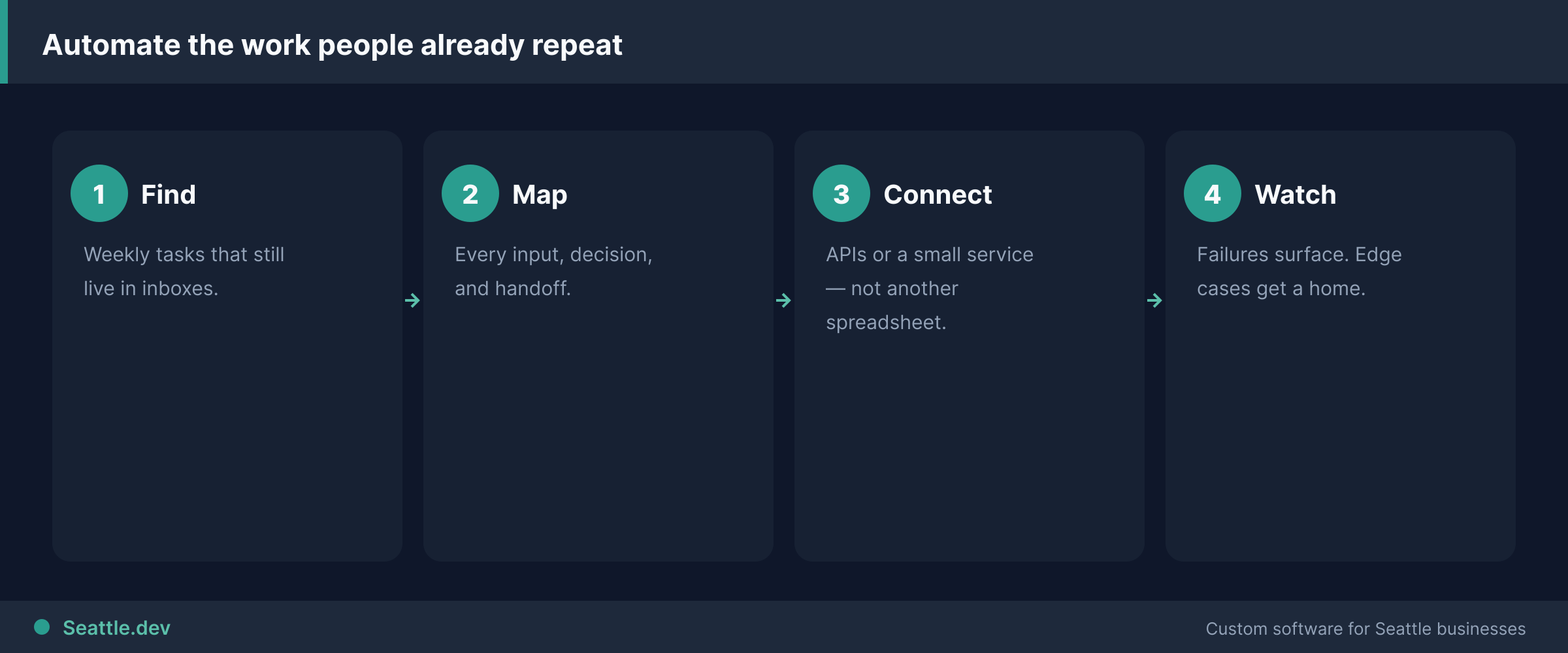
Workflow automation steps
Find the repeat. Connect the systems. Watch the failures.

Automation that matches how work actually happens

Zapier is fine until the process has branches, exceptions, compliance, or volume that needs real software. Then "the integration broke" becomes a monthly fire drill and nobody owns the mess.

I design and build custom workflow automation for Seattle and Washington companies: multi-step business processes, document routing, CRM-to-ops pipelines, and system sync that removes re-entry without papering over bad process. Twenty-seven years shipping production systems as a solo senior operator. You work with me, not a rotating junior bench.

Who this is for

Teams re-keying the same customer into three systems every day. The integration playbook is how to eliminate duplicate data entry.

Approvals stuck in email with no SLA and no audit trail.

Ops leads who hit no-code limits on branching, permissions, or data volume.

Leaders who want metrics the current tools cannot produce without a weekly Excel ritual. If that ritual has become the product, read when spreadsheets become a business liability.

Who this is not for

"Automate everything." If the process is unclear or changes weekly, write the SOP first. Automation freezes chaos into production. The practical guide is put routine work on autopilot.

One simple two-app sync with no edge cases. A well-built Zap or native connector is cheaper. I will say so.

Companies that will not designate an owner for exceptions. Automation fails. Someone has to get a clear alert and a path to fix it.

What I automate

Revenue ops. Lead routing, enrichment, proposal triggers, closed-won handoffs to delivery.

Customer delivery. Onboarding checklists, portal access, status updates without status meetings.

Finance handoffs. Invoice creation, payment status sync, exception queues for failed charges.

Document-heavy work. Intake to structured records, contract status, compliance packets.

Internal ops. Ticket triage, inventory alerts, multi-step employee or vendor flows.

When models help classification or extraction, I pair them with rules. See AI Specialist Seattle. The plumbing is usually API development and sometimes a custom portal for the human side of the process. Full product builds sit under custom software development.

How engagement works

  1. Map the real process, including the exceptions nobody documented.
  2. Design automation: rules vs. AI vs. human checkpoints; pick the system of record.
  3. Build and instrument: APIs, jobs, exception UI, logging, retries.
  4. Train and transfer. Your team knows what runs where and how to escalate.

Most focused automation projects land in weeks and in the lower-to-mid five figures; larger multi-system platforms sit in the $30K–$100K band with 30/40/30 milestones. Fixed-price after discovery. If a no-code tool still wins, I will tell you before you pay for software you do not need.

Next step

Bring one painful process. Schedule a free consultation. I will outline what to automate first, what to leave manual, and what it should cost.

Talk to an expert

Stop paying people to be the integration layer

Free 30-minute call. Bring the handoff that eats a day a week. I will say custom automation, a Zap, or fix the process first.

We take on a small number of new builds at a time so every project gets focused attention.

Prefer a range first? Run the 2-minute cost estimator .

FAQs

What is custom workflow automation vs Zapier?

Zapier is fine until the process has branches, exceptions, compliance, or volume that needs real software. Custom automation owns multi-step business processes with monitoring, retries, and clear ownership when something fails at 2 a.m.

How much does workflow automation cost in Seattle?

Focused automation projects often land in the mid five figures. When automation is part of a portal or multi-system platform, total investment commonly sits between $30,000 and $100,000. I start with the expensive manual path, not a catalog of every possible button.

How long does automation take to ship?

A single painful workflow can go live in 2–6 weeks. Cross-department processes with many systems take longer and ship in phases. Your team still spends time validating edge cases; that is where quality comes from.

When should I not automate?

If the process is still changing weekly or only two people touch it occasionally, fix the process first. Automating chaos makes faster chaos. I will say no when a checklist or a better SaaS config is enough.

Talk to an expert

Stop paying people to be the integration layer

Free 30-minute call. Bring the handoff that eats a day a week. I will say custom automation, a Zap, or fix the process first.

We take on a small number of new builds at a time so every project gets focused attention.

Prefer a range first? Run the 2-minute cost estimator .

Seattle.dev Footer Background
Seattle Dev

Custom web development and design for Seattle businesses. We specialize in API integration, custom web portals, and business automation.