
Put Your Routine Work on Autopilot: A Guide to Workflow Automation
Every business has those tasks everyone does but nobody enjoys. Sending follow-up emails after customer inquiries. Copying data from one spreadsheet to another. Generating the same reports every Monday morning. Updating records across multiple systems when something changes. Chasing down approvals for routine decisions.
These tasks aren't complicated—they're just tedious. They follow predictable patterns: if this happens, then do that. When a customer submits this form, send that email and create this record. When inventory drops below this level, notify these people. When a deal closes, update these systems and trigger this sequence of actions.
Your team members know these tasks are repetitive and mind-numbing. They also know computers should handle this kind of work. And they're right. Workflow automation transforms these routine processes into automated operations that run reliably without constant human attention, freeing your team to focus on work that actually requires human judgment, creativity, and expertise.
Why Manual Processes Persist
If automation makes so much sense, why do businesses still rely heavily on manual processes? Several factors keep companies trapped in inefficiency.
"We've always done it this way." Established processes become invisible. The new hire gets trained on how to manually generate the weekly report, so they do it that way. Nobody questions whether there's a better approach because the current process is simply "how we do things." The inefficiency perpetuates through organizational inertia.
"Automation is too expensive." Many businesses assume automation means large enterprise software with matching enterprise prices. They imagine six-figure projects and six-month implementations. The reality? Many high-value workflow automations are relatively straightforward to build. The cost of automation is often less than a few months of the time currently wasted on manual work.
"Our process is too complex to automate." Every business thinks their situation is uniquely complicated. And in some ways, it is—your specific combination of systems, rules, and requirements is unique to you. But complexity doesn't prevent automation; it just requires custom development that fits your specific needs rather than forcing your processes into generic automation templates.
"We'll change our process soon anyway." Companies hesitate to automate because they're "about to" switch CRM systems or restructure workflows. But that change keeps getting delayed while the inefficient process continues consuming time. Meanwhile, months or years pass with daily productivity losses that automation would have eliminated.
Fear of creating fragile systems. Some businesses tried automation before and it broke. The integration stopped working and nobody knew how to fix it. This creates understandable hesitation. Well-designed automation, however, includes error handling, monitoring, and maintainability. It doesn't create fragility—it creates reliability.
What Makes a Good Automation Candidate
Not every process benefits equally from automation. The highest-value opportunities share common characteristics.
High frequency, low complexity. Tasks that happen dozens of times daily but follow simple, predictable rules deliver huge automation value. Sending confirmation emails. Creating records when forms are submitted. Updating status fields based on specific triggers. These operations are straightforward to automate but time-consuming to do manually at scale.
Perfect accuracy matters. When mistakes are costly but the task is tedious, automation reduces risk. Manual data entry introduces typos. Tired people skip steps. Automation executes the same process exactly the same way every time. For operations where consistency and accuracy are critical, automation eliminates human error.
Information flows between systems. Whenever data moves from one system to another, automation opportunities exist. Creating CRM records from website form submissions. Copying order information from e-commerce to accounting. Updating inventory across multiple sales channels. These cross-system workflows are perfect automation targets because they're purely mechanical—computers moving data between other computers.
Time-sensitive operations. Some tasks need to happen at specific times or after specific delays. Sending follow-up emails three days after an inquiry. Generating reports every Monday at 8 AM. Escalating support tickets that remain unresolved for 24 hours. These scheduled or delayed actions are easy for automation to handle reliably but require people to remember and execute manually otherwise.
Conditional logic with clear rules. "If X happens, do Y" logic is what computers excel at. If a customer spends over $500, tag them as VIP. If inventory drops below 20 units, send a restock alert. If a form submission includes specific keywords, route it to the appropriate team. These conditional workflows automate easily and run consistently.
Common Workflow Automation Opportunities
While every business has unique processes, certain automation patterns solve problems across many industries and departments.
Customer onboarding sequences. When a new customer signs up, a predictable sequence of actions typically follows: send welcome email, create account records, grant appropriate access, schedule check-in calls, add to onboarding email sequences, notify relevant team members. Automating this ensures consistent onboarding, prevents steps from being forgotten, and starts every customer relationship on the right foot.
Lead follow-up and routing. Contact forms, demo requests, and sales inquiries need prompt responses. Automation can immediately acknowledge submissions, create CRM records with appropriate tags and attributes, route leads to appropriate sales representatives based on territory or product interest, schedule follow-up tasks, and trigger nurture sequences. Speed matters in sales, and automation provides instant response.
Report generation and distribution. Many reports follow predictable patterns: gather data from specific sources, format it consistently, and send it to the same people on a regular schedule. Weekly sales reports, monthly financial summaries, daily operational dashboards—these routine reports can generate and distribute automatically. Your team receives the information they need without anyone spending time compiling it.
Approval workflows. Many business operations require approval from managers or specific team members. Expense reports need finance approval. Content changes need review before publishing. Large purchases need authorization. Automated approval workflows route requests to appropriate approvers, track status, send reminders when approvals are pending, and execute approved actions automatically. No more chasing down signatures or wondering what's waiting for approval.
Inventory and supply management. Tracking inventory levels and triggering reorders manually becomes impossible as businesses grow. Automation monitors stock levels across locations and products, alerts appropriate people when inventory drops below thresholds, generates purchase orders automatically for routine restocks, and keeps inventory data synchronized across all sales channels. You prevent stockouts without constant manual monitoring.
Customer support workflows. Support tickets follow common patterns that automation can handle. New tickets automatically create records in your support system, notify appropriate team members, pull in relevant customer context from other systems, escalate unresolved tickets after defined time periods, and send satisfaction surveys after ticket closure. Your support team focuses on solving customer problems rather than managing ticket logistics.
Designing Automation That Actually Works
The difference between automation that improves operations and automation that creates new problems comes down to design and implementation quality.
Handle errors gracefully. Automated workflows interact with systems that sometimes fail. APIs return errors. Networks have intermittent issues. Databases become temporarily unavailable. Robust automation detects these failures, retries operations appropriately, logs issues for investigation, and alerts humans when intervention is needed. Your automation should degrade gracefully rather than failing silently or catastrophically.
Provide visibility into automated processes. Black-box automation creates anxiety. People don't trust what they can't see. Effective automation includes monitoring, logging, and reporting. Team members can see what automation is doing, verify it's working correctly, and troubleshoot issues when they occur. Transparency builds trust and makes maintenance possible.
Allow manual override and intervention. Automation should handle routine cases reliably, but edge cases always exist. Good automation design includes clear ways for humans to intervene, override automated decisions, or manually trigger processes when needed. Automation augments human capability; it doesn't remove human control.
Start with clear success criteria. Before automating, define what success looks like. If you're automating report generation, success might mean reports delivered by 8 AM Monday with zero errors. If you're automating lead routing, success might mean every lead contacted within 15 minutes. Clear criteria let you verify the automation works and measure improvement.
Test thoroughly before deploying. Automation that processes real customer data or affects business operations needs thorough testing. Use test environments and sample data to verify automation behaves correctly in normal scenarios and handles errors appropriately. Testing catches issues before they impact operations.
Document how automation works. Three months after building automation, when something needs to change, someone needs to understand how it works. Documentation doesn't need to be extensive, but it should explain what the automation does, what systems it connects to, what triggers it, and how to troubleshoot common issues. Future maintainers will thank you.
When to Automate vs. When to Optimize
Not every inefficient process needs automation. Sometimes the problem isn't manual work—it's an unnecessarily complicated process that automation would just execute faster without making it actually better.
Before automating a workflow, ask whether the workflow itself makes sense. If a process requires fifteen approval steps, automating the routing doesn't fix the underlying problem of excessive approvals. If report generation is painful because data lives in seven disconnected systems, automating data collection across those systems might be less valuable than consolidating data sources.
Sometimes the right solution is process improvement followed by automation. Eliminate unnecessary steps, simplify approval chains, consolidate data sources, clarify decision criteria—then automate the improved process. This combination delivers more value than automating inefficient workflows.
Other times, automation enables process improvement that wouldn't otherwise be practical. You might want to send personalized follow-up emails to every customer, but doing so manually is impossible at scale. Automation makes the improved process feasible. The key is thinking about automation as enabling better operations, not just making existing operations faster.
The Human Side of Automation
Introducing automation changes how people work, and change creates natural concerns. Addressing these concerns directly determines whether automation succeeds or creates resistance.
"Will automation replace my job?" This fear is understandable but usually misplaced. Automation eliminates tedious tasks, not entire jobs. The customer service representative who no longer manually creates support tickets doesn't lose their job—they spend more time actually helping customers instead of doing data entry. The operations manager freed from generating reports manually can focus on analyzing data and making strategic decisions.
Frame automation as eliminating the boring parts of work so people can focus on interesting, valuable activities. Your team doesn't enjoy repetitive data entry or routine administrative tasks. They enjoy solving problems, helping customers, building relationships, and doing work that makes them feel accomplished. Automation shifts their time toward those satisfying activities.
"How do I know the automation is working correctly?" Provide visibility and verification mechanisms. Show what automation is doing. Create dashboards that track automated operations. Send summaries of automated actions. Let people spot-check automated work initially until trust builds. Over time, as reliability is proven, people gain confidence.
"What happens when something goes wrong?" Explain error handling and escalation processes. Show how automation detects problems and alerts appropriate people. Provide clear escalation paths when human intervention is needed. People trust automation more when they understand how it fails gracefully rather than catastrophically.
Training and transition support. When automation changes workflows, people need to understand the new process. Don't just implement automation and assume everyone will figure it out. Explain what's automated, what still requires human action, how to monitor automated processes, and who to contact if something seems wrong. Support the transition actively.
Measuring Automation Success
Track improvement to justify investment and identify opportunities for further optimization.
Time savings. Calculate how long tasks took manually versus with automation. If generating a report took two hours weekly and now happens automatically, that's 104 hours saved annually per person. Multiply by hourly cost to understand financial impact.
Error reduction. Track error rates before and after automation. If manual data entry had a 2% error rate and automation reduces that to 0.1%, quantify the impact of those prevented errors—customer satisfaction improvements, reduced rework, fewer service failures.
Process speed improvement. Measure how long operations take from start to finish. If lead follow-up happened within 24 hours manually but within 5 minutes with automation, that speed improvement often translates to better conversion rates and customer satisfaction.
Increased capacity. Track how much more your team can handle with automation support. If your support team could manage 100 tickets daily manually and now handles 200 tickets with automation handling routine tasks, that's doubled capacity without doubling headcount.
Team satisfaction. Survey your team about their experience with automated workflows. Are they spending less time on tedious work? Do they have more time for valuable activities? Is their work more satisfying? These qualitative improvements matter for retention and morale.
Getting Started With Workflow Automation
Begin by identifying high-impact opportunities where automation delivers clear value quickly.
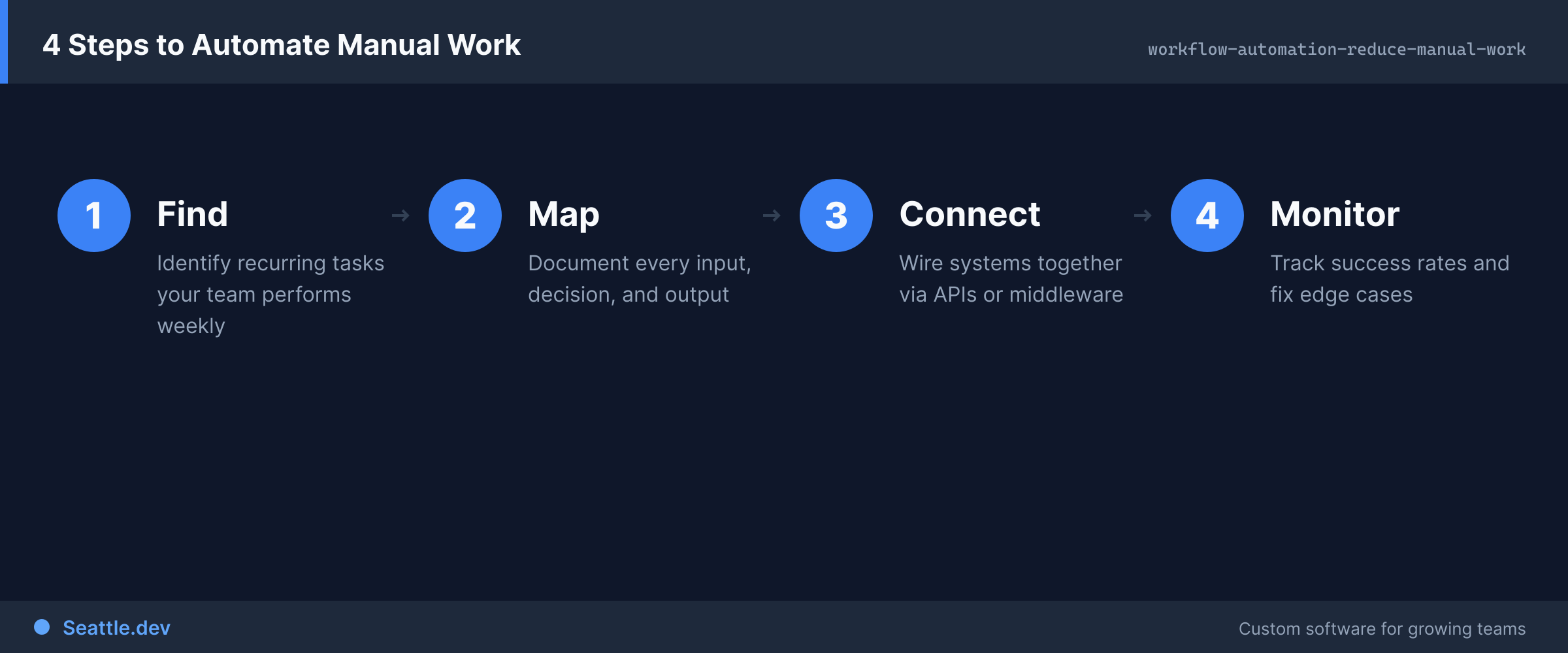
Talk to your team about what wastes their time. They know which tasks are repetitive, tedious, and feel like they should be automated. They encounter the same inefficiencies daily that managers might not see. Listen to their frustrations—those reveal automation opportunities.
Map out current workflows for high-frequency processes. Understanding exactly how things work today—all the steps, systems involved, decision points, and exceptions—guides automation design. You can't automate what you don't understand.
Prioritize based on frequency and simplicity. Automating a task that happens 50 times daily delivers more value than automating something that happens monthly. Starting with straightforward automations builds momentum and proves value before tackling complex workflows.
Ready to reclaim hours wasted on repetitive work? We help Seattle businesses design and implement workflow automation that actually fits how they operate. Schedule a consultation to discuss your team's routine tasks and explore which workflows are prime candidates for automation. We'll identify high-value opportunities and create practical automation that frees your team to focus on work that truly requires their expertise.