


Seattle Dev

HubSpot Integration Services

Connect HubSpot to the systems you already run. Kill silos, automate the handoffs, and keep one source of truth for customers.
Marketer reviewing campaign dashboards at a standing desk in a bright office

HubSpot only helps if the rest of the stack tells it the truth.

How we start

Connect, write a plan, then stay in the work

You are not hiring a vendor who vanishes after a kickoff. You get us as an embedded partner who learns the business, then ships against the plan.

01

Connect

Thirty minutes. We learn how the business actually runs: who buys, what is broken, what a good month looks like after launch.

02

Write a plan

What to build, what to skip, an honest range, and whether we are the right fit. You leave with a path, not a pitch deck.

03

Embed

You work with the people who ship it. We stay in the work after launch so the site does not rot the week after deploy.

HubSpot Work That Matches How You Sell

Custom integrations, workflows, and reporting so the CRM earns its license fee.

Custom HubSpot Integrations

Wire HubSpot to ERP, e-commerce, accounting, and custom apps with clear field maps and conflict rules.

Workflow Automation

Marketing, sales, and service workflows that span tools, not just HubSpot-native triggers.

Custom HubDB Applications

HubDB-backed tools and dynamic content when structured data belongs on the CMS side.

Custom Reporting & Dashboards

Reports that mix HubSpot with data from systems HubSpot never sees.

HubSpot Website Development

HubSpot CMS sites and modules built for your funnel, not a generic theme dump.

HubSpot Training & Support

Hands-on training so your team owns day-to-day changes after launch.

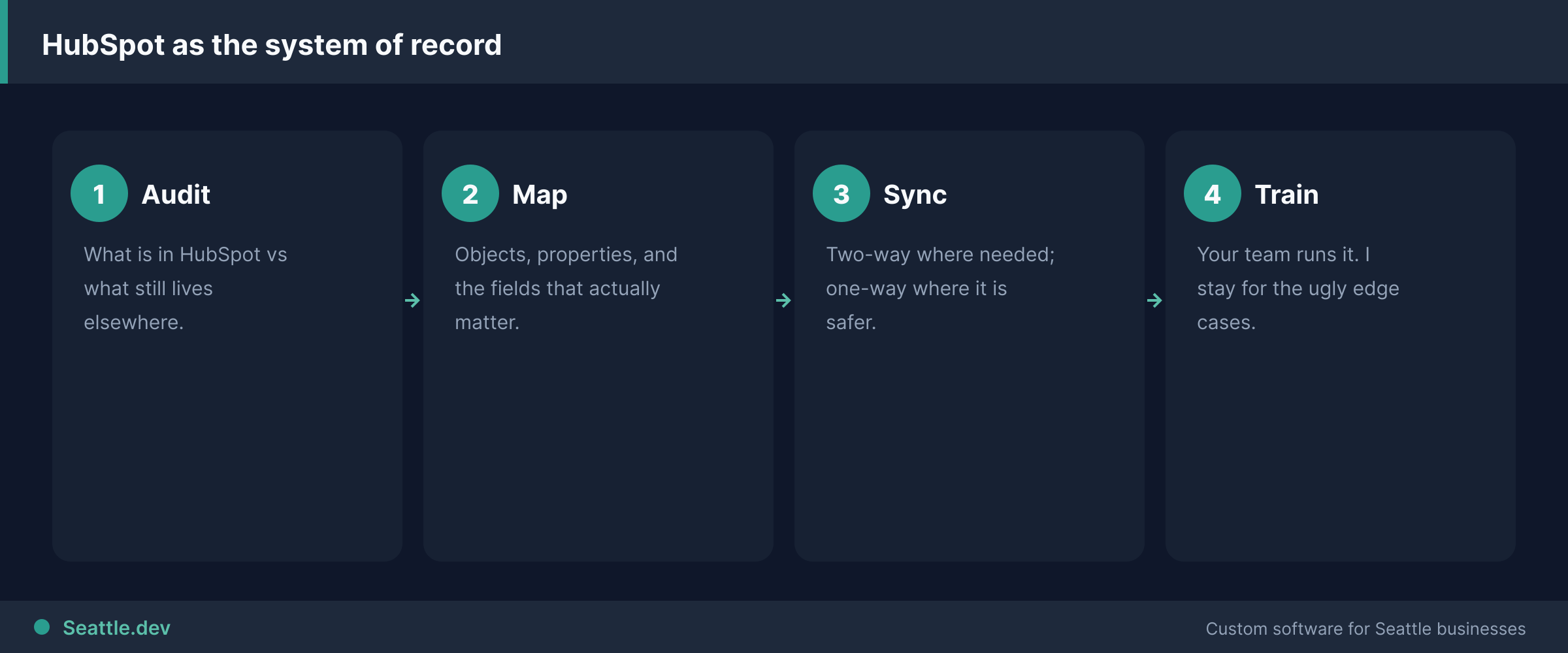
HubSpot integration process
Audit, map, sync, then train the people who live in it.

HubSpot that talks to the rest of your stack

HubSpot is fine software. Most of the pain I see is not HubSpot itself. It is HubSpot living alone while orders sit in Shopify, invoices live in QuickBooks, and someone retypes the same customer into three places before lunch.

I connect HubSpot to the systems you already run so the CRM is a system of record, not a graveyard of half-updated contacts. The goal matches eliminating duplicate data entry between business systems.

Who this is for

Teams on HubSpot Professional or Enterprise that outgrew native connectors and Zapier glue. When the CRM has to feed live ops screens, see integrating your dashboard with business tools.

Sales and marketing ops people who need custom objects, workflows, and reporting that mix CRM data with e-commerce, finance, or internal tools. Larger process maps live under workflow automation that reduces manual work.

Companies that want a HubSpot CMS site or HubDB-backed tools without hiring a full HubSpot agency bench.

Who this is not for

"We just bought Starter and need someone to set up email templates." That is configuration, not custom integration. Use HubSpot's academy or a cheap admin contractor.

Companies that refuse to clean their data. Bad CRM data integrated faster is still bad CRM data. I will say so before I build sync jobs that amplify the mess.

Anyone who needs a full custom CRM. If HubSpot cannot model your process without heroic contortions, look at custom CRM development instead of more middleware.

What I build

Two-way sync with real systems. E-commerce orders and products, accounting invoices and payments, support tickets, and internal apps. Fields map deliberately; conflicts have rules.

Workflows that span tools. A closed-won deal that creates a project, a failed payment that notifies ops, an onboarding sequence that only fires when the warehouse confirms.

Custom reporting. HubSpot data next to numbers from systems HubSpot never sees, so leadership stops pasting CSV into Excel every Monday.

HubDB and CMS work. Structured content, calculators, and partner tools on HubSpot when that is the right delivery surface.

Training for the people who live in it. Docs and a short working session so your team owns day-to-day changes.

Broader plumbing beyond HubSpot: API development.

HubSpot systems I connect

Google already sends hubspot + other tool queries here. I do not ship a thin page per connector. I do ship custom HubSpot integration services for the stacks that show up in real projects:

Project and delivery. Teamwork after a deal closes. Smartsheet when the delivery plan lives in sheets.

Commerce. Amazon seller/order data, PayPal payments, Shopify when the native app drops line items or refunds.

Cloud and data. AWS jobs, Redshift or PostgreSQL warehouses so reporting is not a Monday CSV ritual.

ERP and finance. Business Central, SAP S/4HANA, accounting tools. Native finance apps are fine until invoices, tax, or custom objects disagree with HubSpot.

Comms and ops. 3CX, Mailjet, Cyfe-style dashboards, Zendesk via the same API layer.

Automation platforms. Make / Integromat is fine until branching, volume, or permissions need real software. Then it becomes custom API development.

Each cell is the same decision: native app if it maps; custom API if it does not. Read custom vs native HubSpot integrations.

Custom vs native HubSpot integrations

HubSpot’s marketplace is the right first stop. Custom work starts when:

  • Custom objects or properties the app ignores
  • Two-way sync with conflict rules
  • An ERP, warehouse, or internal database HubSpot never sees
  • A portal that must show live CRM state
  • The native app “works” but staff still retype the exception cases

If a marketplace app plus a cleanup sprint will do, I will say so and not invent a project.

How HubSpot integration services run

  1. Discovery and audit. Objects, properties, system of record, who owns bad data.
  2. Field map and sync rules. Direction, conflicts, real-time vs batch.
  3. Build or configure. Marketplace app where it fits; custom API where it does not.
  4. QA in sandbox. Then a controlled cutover, not a Friday surprise.
  5. Launch, train, monitor. Alerts when sync fails; your team owns day-to-day HubSpot.

Cost and timeline

ScopeTypical rangeTypical timeline
Focused two-system HubSpot syncLow-to-mid five figures2–6 weeks
Multi-system or portal plus CRM$30,000–$100,000Phased
Native-app configuration onlyUsually not a custom projectI will point you to HubSpot or an admin

Bring which objects matter and which system is the source of truth. I will map what HubSpot should own, what it should only display, and what it should not try to do at all.

Talk to an expert

Bring the objects and the other system of record

Free 30-minute call. I will map what HubSpot should own, what it should only display, and what a marketplace app cannot do.

We take on a small number of new builds at a time so every project gets focused attention.

Prefer a range first? Run the 2-minute cost estimator .

FAQs

What does HubSpot integration include?

Reliable sync between HubSpot and the tools that actually run the business: billing, support, product databases, portals, and internal ops. Contacts, deals, custom objects, and webhooks with retries, not a one-time CSV import that drifts next week.

How much does HubSpot integration cost?

A focused HubSpot connection often sits in the mid five figures depending on object count, custom properties, and real-time needs. Larger portal-plus-CRM builds fall in the $30,000–$100,000 ranges I publish for portal work. I scope the highest-ROI objects first.

How long does HubSpot integration take?

A clean two-system sync is often 2–6 weeks. Portals or multi-system maps take longer and ship in phases so sales or ops see working data early.

Should I customize HubSpot heavily or build outside it?

If HubSpot can own the process with properties, workflows, and a few integrations, stay in HubSpot. Build outside when the product, portal, or quoting logic will never fit CRM configuration without constant fights.

What is HubSpot integration?

Connecting HubSpot to the other software that already runs the business so contacts, deals, orders, and invoices stay in sync. That can be a marketplace app, a tool like Make, or a custom API when the native option misses fields or fails weekly.

Should I use the marketplace app or a custom HubSpot integration?

Use the native app when objects and fields match and a missed sync is annoying. Build custom HubSpot integrations when you have custom objects, ERP or warehouse data, conflict rules, or a portal that has to show live CRM state. I will say which side you are on.

Do you integrate HubSpot with Teamwork, Business Central, or Amazon?

Yes, those are typical custom jobs. Teamwork for project delivery after closed-won, Business Central for ERP/finance, Amazon for order and product data. Native apps exist for some of these; custom work starts when they do not map your objects. Details live in the systems section below and in the related guides.

Talk to an expert

Bring the objects and the other system of record

Free 30-minute call. I will map what HubSpot should own, what it should only display, and what a marketplace app cannot do.

We take on a small number of new builds at a time so every project gets focused attention.

Prefer a range first? Run the 2-minute cost estimator .

Seattle.dev Footer Background
Seattle Dev

Custom web development and design for Seattle businesses. We specialize in API integration, custom web portals, and business automation.