Why Your Business Needs a Custom Dashboard (Not Another Off-the-Shelf Tool)
If your "dashboard" still starts with three exports and a spreadsheet glue step, you don't have a dashboard. You have a ritual. And you're paying for both the subscriptions and the labor that props them up.
Tableau, Power BI, Looker, and their cousins are capable products. They're built for broad markets. Broad means flexible for analysts and clumsy for operators who need one screen, their data, and a button that does something. Swiss Army knife when you need a scalpel.
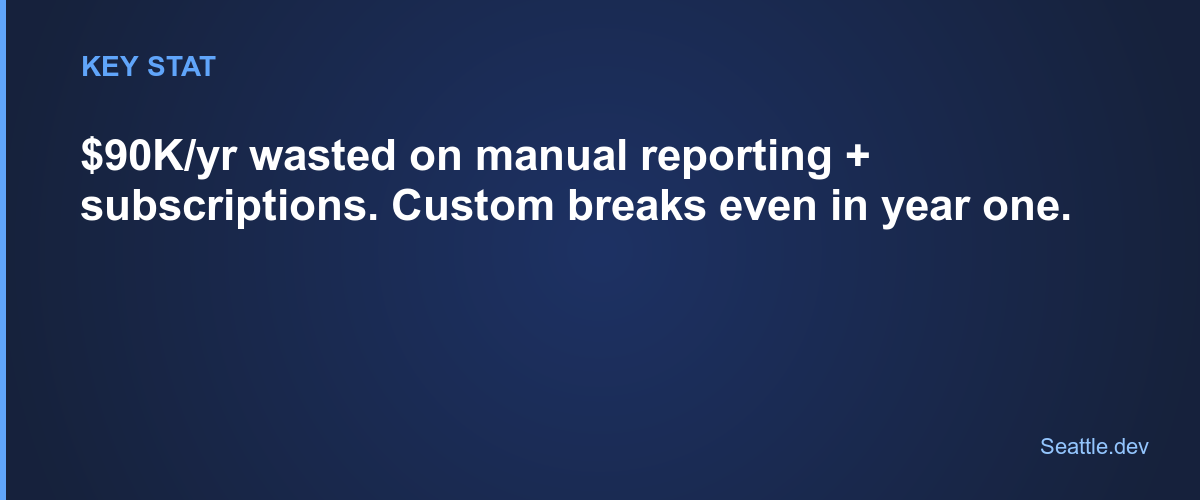
Labor tax. Sales spends half an hour each morning exporting from three systems, pasting into sheets, and refreshing a board that should have been live. Ten people, that pattern, and you've invented a full-time job whose only product is fighting tools.
Slow decisions. Executives waiting on a hand-built report make gut calls. Pricing moves late. Trends show up after the window closed. The tool didn't fail loudly. It failed quietly by making truth expensive.
Subscription creep. Twenty a month becomes two hundred with the features you need, then five hundred for seats. You're at five figures a year for something that still doesn't fit, with a vendor pricing ladder you never voted for.
Generic tools still win for pure exploration, weekly ad-hoc viz work, or truly basic shared charts. If that's your job, buy them. If the dashboard is how the business runs day to day, the fit question gets harder.
Where off-the-shelf breaks for operators
Odd data sources. Critical numbers live in a custom CRM, a legacy box, or a database with no friendly connector. You end up on middleware, manual exports, or "we'll sync it someday."
Action, not just charts. Teams need to update a record, trigger a workflow, or open the next step without bouncing through four apps. Most BI tools show. They don't operate.
Multiple audiences, one product. Executives want a handful of KPIs. Ops wants process detail. Customers want a branded portal. One generic workspace usually becomes a cluttered compromise.
Brand and trust. When clients log in and see a bolted-on analytics skin, it signals "we didn't invest in this." A dashboard that feels native to your product does the opposite.
What a custom build actually is (and isn't)
Not a science project from atoms. Focused software: your workflows, your sources, your permissions, modern web stack, boring reliable database, APIs into systems you already own.
I start with decisions and actions, not chart catalogs. Who decides what? What do they do next? Which sources must connect? And the cost-shaping question people skip: real-time or batch? Live sync means webhooks, always-on plumbing, and ops burden. Overnight import is simpler and cheaper. Most businesses only need true real-time for one or two metrics. The rest can refresh overnight and nobody's day changes. Deciding that honestly saves real scope.
Timeline and money, in the ranges I quote constantly: a simple internal dashboard often runs $30,000–$50,000 and 4–6 weeks. A customer-facing portal more often lands $50,000–$75,000 and 8–10 weeks. Compare that to months of fighting a generic tool into a shape it resists.
Skip the fake case studies
I won't invent client metrics to sell you. You've seen the genre: anonymous "SaaS company" with a tidy retention lift, anonymous "healthcare provider" with a round admin-time cut. If a number didn't come from a real engagement or a public FAQ, it doesn't belong here.
What I will say from how these projects actually go: the wins show up as fewer manual consolidations, one login instead of five, permissions that match roles, and workflows that start from the same screen as the metric. Portfolio work on this site is stronger on marketing sites and brand systems today than on a published dashboard teardown, so until there's a documented dashboard case study with real numbers, treat ROI as something we calculate from your hours and your tool stack, not from a blog's imagination.
A grounded way to run the numbers
Price the current mess. Hours per week spent exporting, reconciling, and rebuilding reports. Fully loaded cost of those hours. Annual spend on BI and "temporary" glue tools.
Then price the build in FAQ ranges: often $30K–$75K depending on internal vs. customer-facing scope, integrations, and user types. Hosting commonly $200–500 a month. Ongoing support plans start around $750 a month if you want someone who already knows the system when something breaks.
If annual labor-plus-subscriptions already approach the build price, the question flips from "can we afford custom?" to "why are we renting a permanent tax?" Better decisions and faster response are upside on top of that, not the only line you need to justify the work.
Build vs. buy without the fog
Lean custom when you say yes to most of these:
- Unique or awkward data sources
- Users need to act inside the dashboard, not only stare
- Distinct audiences with different permissions and layouts
- You'll maintain this for years, not a quarter
- The screen is core to operations or customer experience
- Compliance, security, or branding requirements that generic tools fight
Mostly no? Off-the-shelf may be enough. Mostly yes? Compromising forever is the expensive path.
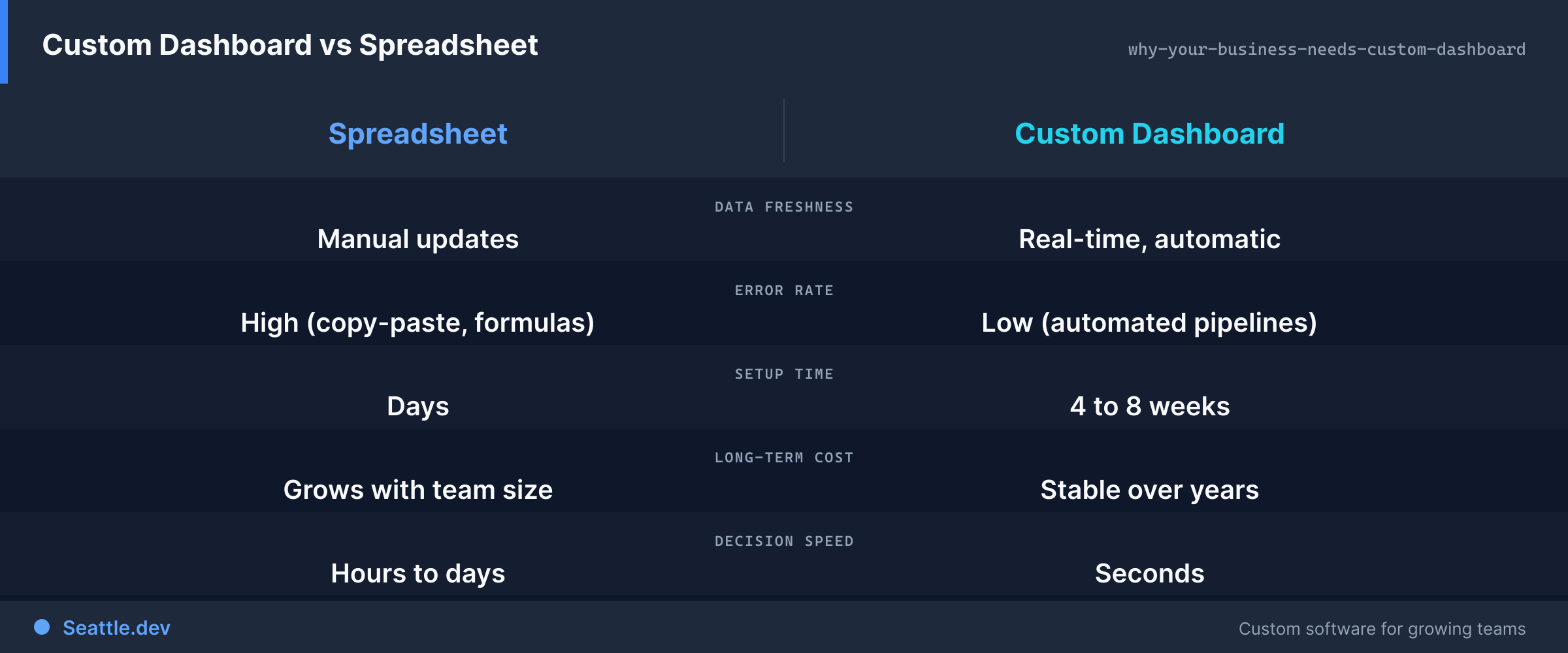
One screen for the day's priorities. Actions without tool-hopping. Leadership glanceable without waiting on a human report factory. Customers in a portal that feels like your product. Fast loads, any device, sources connected on purpose. Changes in days when requirements shift, not a quarterly professional-services engagement. New hires don't need a week of "how we build the spreadsheet."
The best dashboards become boring infrastructure. Like power and water. When people stop talking about the tool and just work, you built the right thing.
Start small on purpose
You don't need a forever roadmap on day one. Map the pain, pick the minimum slice that removes the worst ritual, ship it, learn, extend. For a quick ballpark before we talk, the cost estimator walks the same drivers a real quote uses: integrations, user types, real-time vs. batch.
The question isn't whether custom dashboards are fashionable. It's whether you can keep paying hidden labor and subscription tax for tools that were never shaped around how you operate.
Schedule a consultation if you want a blunt read on your stack: costs, timeline, and whether custom is justified. No invented case-study percentages. Just the math of your situation.