

Portal Rescue: How to Fix a Failing Custom Portal Without Starting Over
There's a specific dread when a custom portal that cost six figures and a year of calendar time still isn't working. Users email spreadsheets around it. Pages time out. The original developers are gone and the code is tribal knowledge. Or it "works" but is so slow people invent workarounds.
The instinct is often "burn it down and rebuild." Sometimes that's right. Usually it isn't. Most failing portals can be rescued, migrated, or hardened for less than a greenfield rebuild if you diagnose first and quote second. That's how I run website rescue services: no rewrite-everything sales pitch until we know what's actually broken. If the portal is still the right product, I treat the rebuild-or-repair decision as custom web portal development, not a brochure-site refresh.
The failure patterns I see repeatedly
Adoption death spiral. Beautiful portal, empty sessions. People still call for data the UI already shows. That is almost never "users hate change." It's a product that doesn't match the job: confusing navigation, missing critical steps, or more friction than the old process. Usability problem first, code quality second.
Performance collapse under real data. Demo volumes were fine. Production volumes are not. Dashboards take minutes. Timeouts. Refresh loops make it worse. Usually bad queries, missing indexes, no caching, or a database that was never sized for reality. Fixable without a rewrite if someone can actually read the slow path.
Integrations that break on every vendor update. Salesforce changes something, sync dies. QuickBooks rotates an API, billing stops. You're paying retainers just to keep the lights on. That's missing abstraction, weak error handling, and no version strategy. Stabilize the edges; keep the core if the core is sound.
For modern APIs I use throttling, caching, and batching so busy periods don't melt the sync. For systems with no API at all, scheduled SFTP/CSV is boring and reliable. Boring is the goal.
Unmaintainable codebase. No docs, tangled architecture, simple features take weeks because nobody wants to touch the wrong module. This is the case that most often justifies rebuild, and even then you usually keep the data model, the hard-won requirements, and the user research.
Security that would not pass a casual review. Homegrown auth, unsalted or weakly hashed passwords, SQL injection paths, no rate limits. Patch what you can immediately. Replace auth with known libraries. Plan structural work without pretending a sticker over the hole is a strategy.
Diagnose before you decide
Technical audit: architecture, security, schema and query performance, integration patterns, debt level, hosting, load under realistic traffic. You're separating "wrong architecture" from "sloppy implementation of a decent design."
Watch people work. Don't only interview. Observe where they stall, what they bypass, which features they ignore. Users under-report friction they have normalized.
Use the data. Actual usage vs intended usage, abandoned flows, support ticket themes, error rates, slow endpoints.
Talk to stakeholders. Original goals, how priorities shifted, what still works, political constraints, what "fixed" would mean. Sometimes a "failing" portal works fine and lost executive sponsorship.
Fix, migrate, or rebuild
Fix when the architecture is basically sound, problems are localized (perf, one integration, auth, UX), the data model still matches the business, and documentation exists or can be rebuilt without archaeology.
Migrate when the logic is good but the stack is obsolete, you need cloud or better scale, or you're consolidating systems. Migration keeps business rules and data while re-platforming. Less rediscovery risk than a full rethink.
Rebuild when architecture is wrong for current needs, debt is most of the codebase, security can't be patched into shape, nobody can safely change the system, fix cost approaches rebuild cost, or requirements have moved so far the design is a liability. Even then: keep cleaned schema knowledge, integration maps, business rules, and everything the failure taught you.
I use rough thresholds as conversation starters, not law: if fixing looks like 70%+ of rebuild cost with worse maintainability afterward, stop romanticizing the old code.
Rescue moves that pay
Performance: indexes on hot paths, caching, query rewrites, connection pooling, CDN for static assets, lazy-load secondary data. An 8-second page becoming sub-second feels like a new product.
Integrations: retries with backoff, circuit breakers, adapter layers around third-party APIs, logging, webhooks instead of blind polling where possible, graceful degradation when a dependency is down.
Security: replace custom auth, proper password hashing (bcrypt/Argon2), rate limits, parameterized queries, HTTPS everywhere, security headers, audit logging, a real pen test.
Usability: fewer clicks for common jobs, navigation that matches mental models, search that works, mobile that isn't an afterthought. Adoption follows ease more than feature count.
Debt: document before you touch, refactor the modules that hurt daily, add tests around them, modernize dependencies in slices. You won't erase debt in a sprint. You can stop the compound interest.
Migration without a big-bang funeral
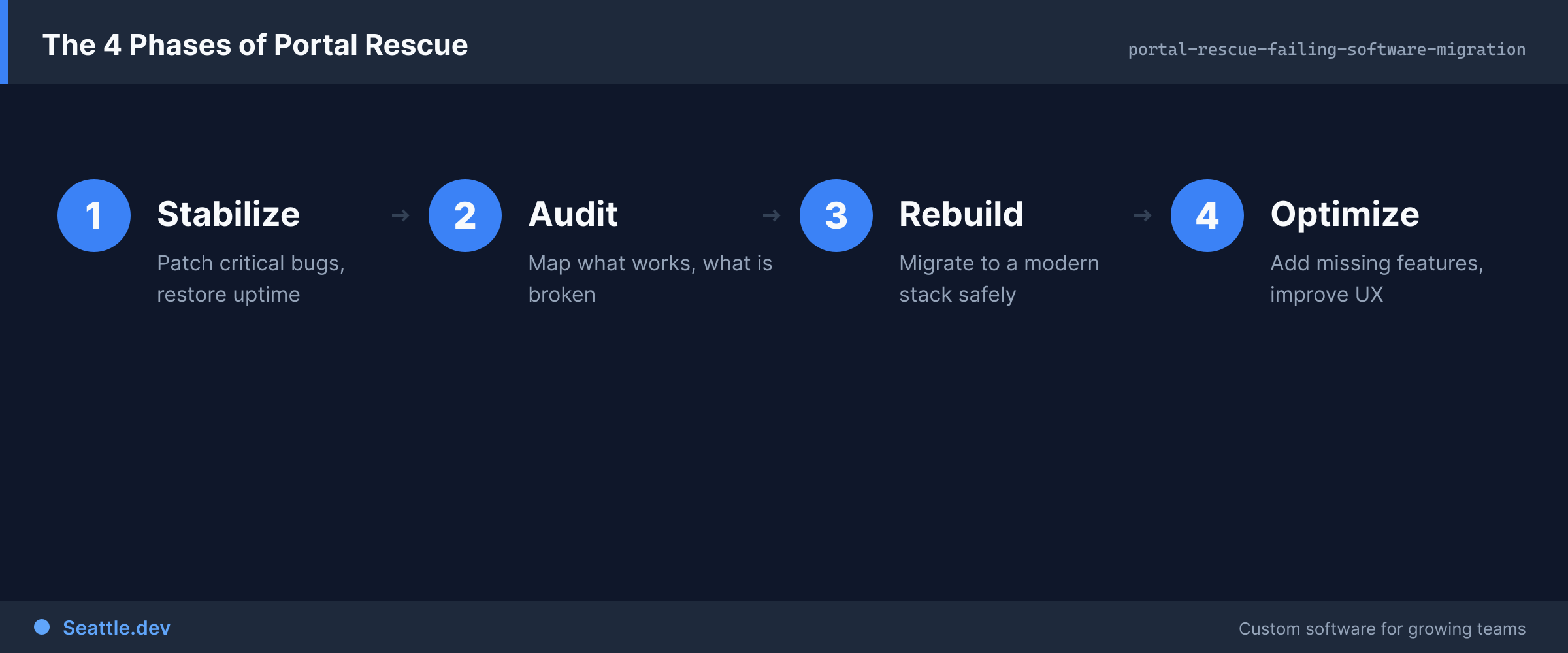
Run old and new in parallel. Migrate data carefully, verify it, move features by priority, shift users gradually, keep the old system as fallback.
The parallel run is the part owners underestimate. Keep the old process alive through a real business cycle, not a quiet week of demo traffic. Test against actual legacy systems, not mocks. Legacy quirks are one of the top delay sources I see, right next to waiting on owner decisions and scope creep. If you're unsure where you stand, use the migration readiness assessment before anyone quotes a rewrite.
Data: export to a neutral format, clean during move, verify integrity obsessively, plan rollback. Feature parity is not a virtue. Analytics will show which features are dead weight. Kill them on purpose.
Train before launch, not after. Superusers, docs, feedback loops. Technical success with user rejection is still failure.
When rebuild is honest
Keep: cleaned schema, real workflows, integration contracts, validation rules, research on what users hated and loved, edge cases the org learned the hard way. Ignore that and you'll rebuild the same failure with a newer framework.
Use the rebuild to install discipline you skipped the first time: maintainable stack, tests from day one, proven auth, monitoring, docs. Run it like any serious custom software development engagement: clear requirements, staged builds, fixed price.
What rescue actually costs
Rough planning ranges, situation-dependent:
- Performance work: $10K–$30K, often large perceived improvement
- Integration stabilization: $15K–$40K
- Security hardening: $20K–$50K
- Usability redesign (research through implementation): $25K–$60K
- Full migration: $50K–$150K
- Complete rebuild: $75K–$250K+
Compare against status-quo pain. If you're spending $5K a month keeping a broken portal limping, a $50K fix pays back in a year of avoided waste alone, before counting the value the portal was supposed to create.
Don't forget the boring line items: hosting for most SMB portals runs $200–$500/month, and ongoing support plans start around $750/month so someone who knows the system answers when things break. For the rescue itself, get fixed price with 30% start, 40% midpoint, 30% launch. If I quote $50,000, that's what you pay unless you change scope.
Who should do this work
Rescue is a different skill than greenfield. You want someone who can diagnose, who has lived in legacy code, who will recommend a fix when a rebuild would pad the invoice, and who can explain options without drama.
Waiting makes it worse. Debt compounds, workarounds calcify, and the business value you paid for stays on the shelf.
If you're stuck with a portal nobody trusts, schedule a consultation. I'll tell you whether fix, migrate, or rebuild is the honest path, with a cost and timeline that match the diagnosis, not a sales template.