[object Object]

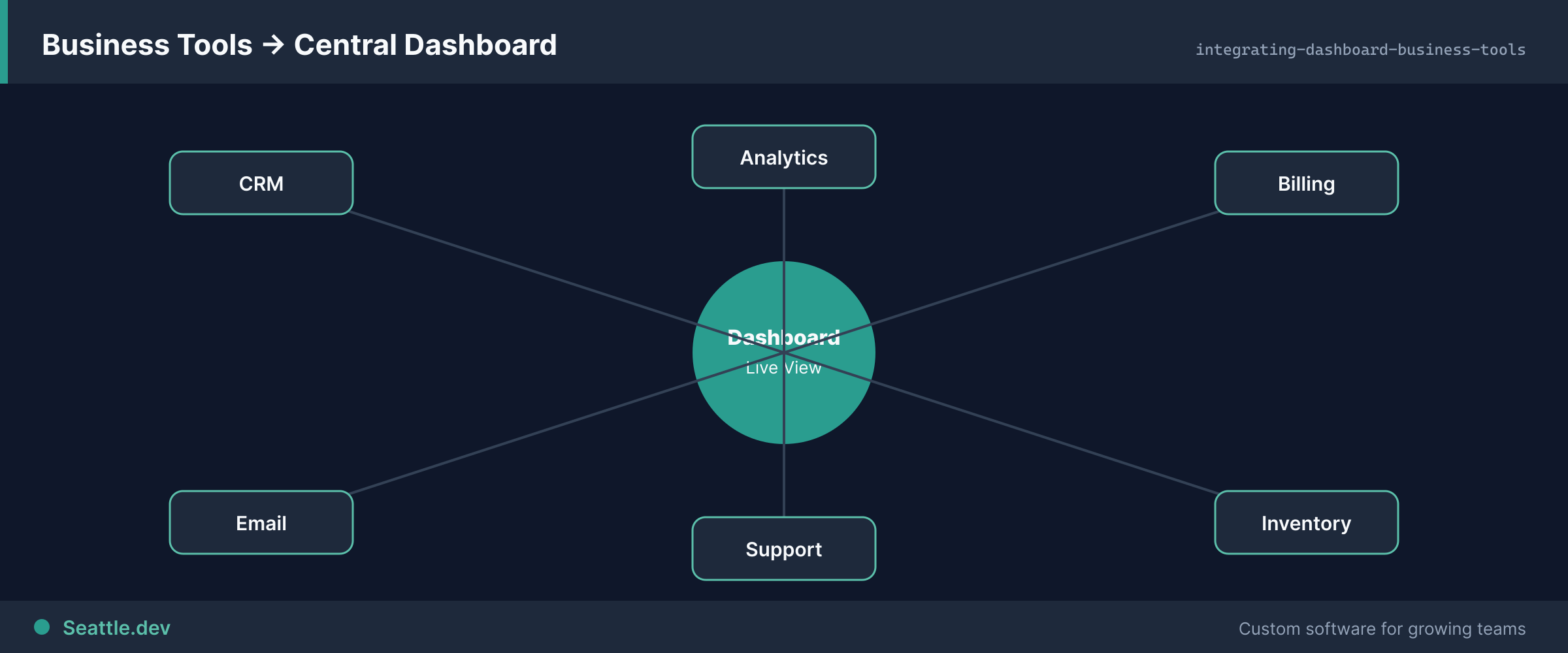
The value of a dashboard isn't the dashboard itself—it's the consolidated view of information scattered across multiple systems. Your CRM holds customer data. Your financial system tracks revenue. Your support platform contains service metrics. Your analytics tools monitor website behavior. Each system answers specific questions, but strategic decisions require seeing them together.

Integrating Your Dashboard: Connecting CRM, Analytics, and Business Tools

The value of a dashboard isn't the dashboard itself—it's the consolidated view of information scattered across multiple systems. Your CRM holds customer data. Your financial system tracks revenue. Your support platform contains service metrics. Your analytics tools monitor website behavior. Each system answers specific questions, but strategic decisions require seeing them together.

Most businesses respond by manually exporting data from each system, combining it in spreadsheets, and creating reports. This works until it doesn't—when data volumes grow too large for spreadsheets, when decisions need real-time information, or when the person maintaining this process quits and nobody else understands how it works.

Dashboard integration solves this by automatically pulling data from source systems, transforming it consistently, and presenting unified views. But integration is where dashboard projects commonly fail—underestimated complexity, fragile connections, and data quality issues turn elegant dashboards into unreliable tools people stop trusting.

Let's explore how to build dashboard integrations that work reliably, handle real-world messiness, and provide the consolidated visibility that drives better decisions.

Understanding Your Integration Requirements Before Writing Code

The biggest integration mistakes happen before any code is written—misunderstanding what data exists where, what it means, and how it needs to flow. Successful integrations start with thorough discovery.

Map your complete data landscape. List every system that contains information relevant to dashboard users. This typically includes obvious systems—CRM, ERP, financial software—and less obvious sources like support ticketing, marketing automation, project management, or custom databases. Don't assume you know all data sources; ask the people who will use the dashboard what information they need and trace back to where it originates.

Understand data relationships and dependencies. Data in different systems often represents the same entities—customers, products, transactions—but uses different identifiers. Your CRM might identify customers by email address, your financial system by account number, and your support platform by username. Successfully integrating requires mapping these relationships correctly. Mismatched customer data creates dashboards showing different revenue per customer than the actual total because records weren't properly aligned.

Determine required freshness for different data types. Not all data needs real-time updates. Sales metrics might need hourly updates. Financial data might refresh daily. Historical trend data might update weekly. Understanding required freshness prevents over-engineering real-time pipelines for data that changes slowly and under-engineering batch processes for information that needs immediate visibility.

Identify master data sources. When the same information exists in multiple systems, which is the authoritative source? If customer names differ between CRM and billing system, which is correct? Establishing data authority prevents showing conflicting information and guides resolution when inconsistencies appear.

Understand access patterns and query requirements. How will users actually use the dashboard? If they need to filter by date range and product category, that drives index requirements and data organization. If they need to drill from summary to detail, that affects how you structure data. Design data architecture around actual usage rather than theoretical possibilities.

Common Integration Patterns and When to Use Each

Different scenarios call for different integration approaches. Choosing appropriately from the start prevents painful rework later.

REST API integration is the most common and broadly supported pattern. Most modern SaaS platforms provide REST APIs for programmatic data access. Your dashboard makes HTTP requests to external systems, receives JSON or XML responses, and processes the data. REST APIs work well for on-demand queries, moderate data volumes, and systems where you control request timing.

The challenge with REST APIs is often rate limiting—providers restrict how many requests you can make per hour or day. If your dashboard needs to query thousands of records, you might hit limits. Planning data refresh schedules and caching appropriately avoids rate limit issues.

GraphQL integration provides more efficient data fetching when supported. Instead of multiple REST calls to fetch related data, GraphQL queries can retrieve everything needed in one request. This reduces network overhead and simplifies client code. Use GraphQL when providers offer it and when you need to fetch complex, related data efficiently.

Webhook integration enables real-time updates by having external systems push data to your dashboard when events occur. Instead of polling for changes, systems notify you immediately. Webhooks work excellently for event-driven scenarios—new sales, support tickets, payment events—where you need immediate visibility. The tradeoff is complexity in receiving, processing, and ensuring reliable delivery of webhook payloads.

Database replication provides direct access to source data when you control both systems or have database-level access. You can set up read replicas, use database sync tools, or implement change data capture. This delivers the freshest data with minimal latency but requires careful management to prevent impacting source system performance. Use database integration when you need real-time access to large data volumes and have appropriate infrastructure control.

File-based integration remains relevant for legacy systems without APIs or for bulk data transfer scenarios. Systems export data files (CSV, XML, JSON), your dashboard imports and processes them. This works for systems that lack modern APIs or when transferring large historical datasets. The limitation is freshness—file-based integration is typically batch-oriented rather than real-time.

ETL pipelines serve complex scenarios requiring significant data transformation. Extract data from multiple sources, transform it into consistent formats with proper relationships, and load into a data warehouse or analytics database. Your dashboard then queries this consolidated data store. ETL makes sense when integrating many sources, performing complex transformations, or serving analytics that need data warehouse capabilities.

Building Reliable Integration Infrastructure

Integration reliability separates dashboards people trust from those people abandon. Unreliable integrations create dashboards showing stale or incorrect data, destroying user confidence.

Implement comprehensive error handling. Networks fail, APIs return errors, and data sometimes doesn't match expectations. Your integration code must handle every failure mode gracefully. Log errors with enough context to debug issues. Implement retry logic with exponential backoff for transient failures. Alert on persistent failures that need human attention. Never silently fail and leave dashboards showing stale data without indication.

Design for API rate limits and quotas. Every API has limits on requests per minute, per hour, or per day. Exceeding limits gets your integration blocked or throttled. Implement rate limiting in your integration code that respects provider limits. Spread requests over time rather than bursting. Cache responses when appropriate to reduce request volume. Monitor your usage against limits to prevent surprises.

Cache intelligently to reduce load and improve performance. Repeatedly fetching the same data wastes resources and slows dashboards. Implement caching with appropriate expiration times. Frequently changing data might cache for minutes. Stable data might cache for hours or days. Use cache headers from APIs to guide caching decisions. Implement cache warming for predictable access patterns so users don't wait for slow API calls.

Validate data quality continuously. Never assume external data is correct or complete. Implement validation checking for expected formats, required fields, reasonable value ranges, and logical consistency. When validation fails, log issues and alert rather than blindly displaying bad data. Track data quality metrics over time to identify degrading sources before they affect dashboards.

Monitor integration health actively. Track success rates, response times, error frequencies, and data freshness for each integration. Implement alerting that notifies when integrations stop working, slow significantly, or show unusual patterns. Don't wait for users to report problems—detect and fix integration issues before they impact dashboard users.

Handling Data Transformation and Normalization

Data from different sources rarely arrives in formats that work together directly. Effective integration requires thoughtful transformation.

Normalize identifiers across systems. When multiple systems reference the same entities (customers, products, locations), establish canonical identifiers that map between system-specific IDs. Store these mappings in your integration layer so you can link related data correctly. Handle cases where mapping is ambiguous—multiple customer records might match, or no clear match exists.

Standardize data formats consistently. Different systems format the same information differently. Dates might be ISO 8601 strings, Unix timestamps, or "MM/DD/YYYY" text. Currencies might include symbols or be bare numbers. Phone numbers might have formatting or be digit strings. Standardize everything to consistent internal formats so dashboard code doesn't need to handle variations.

Handle missing and null data appropriately. External systems often have incomplete data. Required fields might be empty. Optional information might be missing. Decide how to handle each case—should missing revenue default to zero or remain null? Should empty customer names use placeholder text or appear blank? Consistent handling prevents confusing dashboard displays and misleading metrics.

Manage data type conversions carefully. Systems represent the same information with different data types. Numeric IDs might arrive as strings. Boolean values might be "true"/"false" text, 1/0 numbers, or "yes"/"no" strings. Currency might be integers (cents) or decimals (dollars). Convert everything to appropriate internal types rather than mixing types and causing subtle bugs.

Implement business logic transformation where needed. Sometimes raw data from sources isn't what dashboards should display. You might need to calculate derived metrics, apply business rules, or aggregate data differently. Implement this transformation logic clearly and testably. Document assumptions so others understand why transformation happens and can maintain it.

Security and Authentication for Integrations

Integrations handle sensitive data and credentials, requiring careful security implementation.

Store credentials securely, never in code. API keys, passwords, and tokens should never appear in source code. Use environment variables, secret management systems, or encrypted configuration. Rotate credentials regularly and audit access. Implement least-privilege principles—give integrations only the permissions they need, not administrative access.

Use OAuth when available instead of static tokens. OAuth provides better security through time-limited tokens, granular scopes, and user-specific access. When external systems support OAuth, use it rather than static API keys. Implement proper token refresh logic so integrations continue working when tokens expire.

Encrypt data in transit and at rest. All API communication should use HTTPS/TLS. Data stored in your systems should be encrypted at rest, especially sensitive information like customer data or financial details. Never transmit credentials or sensitive data over unencrypted connections.

Implement audit logging for compliance. Track which integrations accessed what data when. This audit trail is important for security investigation, compliance requirements, and understanding usage patterns. Log enough information to be useful but avoid logging sensitive data like passwords or full API responses containing personal information.

Handle authentication failures gracefully. When credentials expire or are revoked, integrations should detect this quickly and alert rather than repeatedly attempting failed requests. Implement authentication health checks that verify credentials periodically and notify before expiration when possible.

Specific Integration Scenarios and Solutions

Common integration scenarios have proven patterns that save discovery time and prevent reinventing solutions.

Salesforce integration benefits from their comprehensive REST and SOAP APIs plus specialized libraries. Use Salesforce SOQL queries to fetch needed data efficiently. Implement OAuth for user-specific access. Handle Salesforce's API request limits carefully—they're generous but can be exceeded with poorly designed queries. Consider Salesforce Platform Events or Change Data Capture for real-time updates instead of polling.

HubSpot integration works well through their REST APIs with good documentation. Use their v3 APIs for modern implementations. Leverage batch endpoints to fetch multiple records efficiently. Implement webhook subscriptions for real-time updates to contacts, deals, or tickets. Handle HubSpot's rate limits by spreading requests and caching responses.

QuickBooks integration requires OAuth and has specific requirements around token refresh and scopes. QuickBooks data model is complex—understand their entities and relationships thoroughly. Consider whether you need QuickBooks Online API (cloud) or Desktop SDK (on-premise). Batch operations where possible since individual queries can be slow.

Stripe integration provides excellent APIs for payment and subscription data. Use webhooks extensively for real-time updates about payments, subscriptions, and customer events. Stripe's API is well-designed and documented. Handle idempotency properly for operations that might retry. Monitor webhook delivery and implement replay mechanisms for missed events.

Google Analytics integration requires OAuth and uses specific API patterns. Understand dimensions versus metrics and how to construct queries. Respect quota limits carefully—they're lower than many other platforms. Consider using Google Analytics 4 API for modern implementations. Cache reports aggressively since historical data rarely changes.

Custom database integration needs careful performance consideration. Use read replicas if available to avoid impacting production databases. Implement connection pooling and query optimization. Consider materialized views or dedicated reporting databases for complex analytics. Index appropriately for dashboard query patterns.

Testing Integration Reliability

Integration bugs are subtle and often appear only under specific conditions. Comprehensive testing catches problems before users experience them.

Test error conditions explicitly. Don't just test happy paths where everything works. Simulate network failures, API errors, timeouts, and malformed responses. Verify your integration handles each failure appropriately—retrying when sensible, alerting when necessary, and never corrupting data or crashing silently.

Validate data transformation with real examples. Use actual data from production systems (appropriately sanitized) to test transformation logic. Real data contains edge cases you won't think to test with made-up examples. Verify that date conversions handle timezones correctly, that currency calculations maintain precision, and that text fields handle special characters.

Performance test with realistic data volumes. Integration code that works fine with 100 records might collapse with 100,000. Test with production-scale data to identify performance problems. Verify that query times remain acceptable, memory usage stays bounded, and database queries use indexes effectively.

Monitor integrations in production continuously. Integration tests in development can't replicate all production conditions. Implement monitoring that tracks integration health in production—success rates, response times, error frequencies, data freshness. Alert when metrics deviate from normal patterns.

Moving Forward with Dashboard Integration

Dashboard integration is where strategic vision meets operational reality. The dashboard design might be perfect, but without reliable integration delivering accurate, timely data, it's useless.

Successful integration requires understanding your data landscape thoroughly, choosing appropriate integration patterns, implementing robust error handling, and monitoring actively. The investment in integration infrastructure pays dividends in dashboard reliability and user trust.

Start with critical integrations that deliver the most value. Build them properly with comprehensive error handling and monitoring. Prove the approach works before expanding to additional systems. Each successful integration increases confidence and provides reusable patterns for subsequent integrations.

Ready to integrate your business systems into unified dashboards that provide real insight? Schedule a consultation to discuss your specific systems, data requirements, and integration challenges. We'll help you design integration architecture that delivers reliable, accurate data without the fragility that plagues most integration attempts.

Ready to Start Your Project?

Let's discuss how we can help bring your ideas to life

Schedule a Free Consultation
Bandmate Footer Background
Seattle.dev Logo

Custom web development and design for Seattle businesses. We specialize in API integration, custom web portals, and business automation.