
Data Migration Done Right: Moving to New Systems Without Losing Your History
Your business data represents years of operations. Customer relationships, transaction history, product information, financial records, operational knowledge—all captured in your existing systems. This data is valuable. It informs decisions, enables operations, and maintains continuity with your customers and suppliers.
Then you decide to change software. Maybe you're outgrowing your current system. Perhaps you're moving from commercial software to a custom solution. Or you're consolidating multiple tools into a unified platform. Whatever the reason, you face a critical challenge: moving all that valuable data from old systems to new ones without losing information, corrupting records, or disrupting operations.
Data migration sounds straightforward—export from the old system, import to the new one, done. The reality is far more complex. Data structures differ between systems. Historical records have inconsistencies accumulated over years. Relationships between data must be preserved. And your business can't stop operating while migration happens. Poor migration destroys data value or creates messy situations that require months of cleanup.
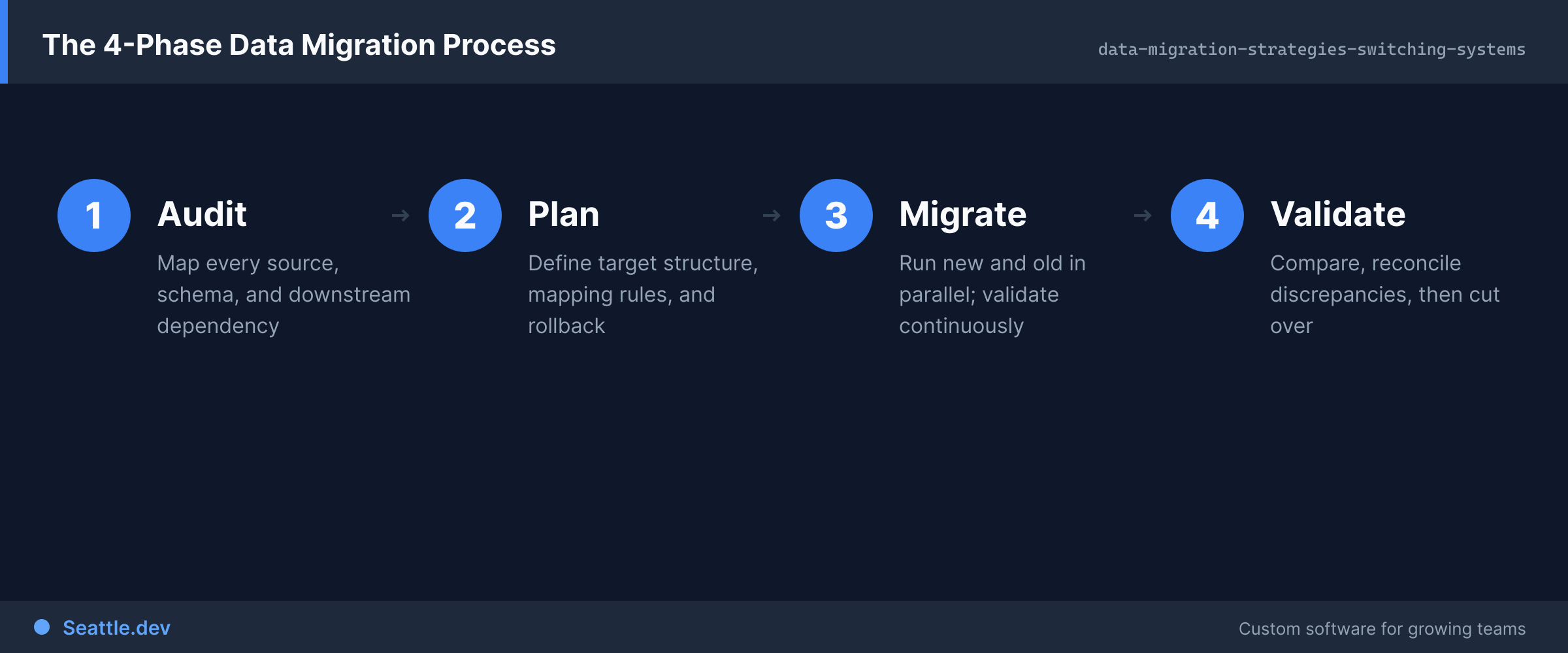
Successful data migration requires planning, careful execution, and thorough validation. Let's explore how to migrate data successfully without losing your history or disrupting your business.
Why Data Migration Is Harder Than It Seems
Several factors make data migration complex and risky when underestimated.
Data structures rarely match between systems. Your old system organizes information one way; your new system organizes it differently. Maybe the old system stores addresses as a single text field while the new system separates street, city, state, and zip code. Perhaps the old system allows one contact per customer while the new system supports multiple contacts with different roles. These structural differences require transformation—mapping old structures to new structures while preserving all meaningful information.
Simple field-to-field mapping works for straightforward conversions. Complex structural differences require understanding business logic, making decisions about how to represent old data in new structures, and sometimes enriching data to fit new requirements.
Historical data contains inconsistencies. Years of data entry by different people under different processes creates inconsistency. Addresses formatted differently. Names capitalized inconsistently. Required fields that weren't always required, leaving gaps in older records. Product codes that changed formats over time. These inconsistencies often don't cause problems in the old system because people work around them, but they become obstacles during migration.
Migration is an opportunity to clean data—standardizing formats, filling gaps, correcting errors. But this cleaning requires identifying inconsistencies, deciding how to handle them, and implementing cleaning logic. Mechanical data transfer perpetuates problems into new systems.
Relationships and references must be maintained. Business data isn't independent records—it's interconnected. Customers have orders, orders have line items, line items reference products. These relationships must be preserved during migration. If customer records get new IDs in the new system, all order records must update to reference the new customer IDs. These relationship mappings are complex when migrating millions of interconnected records.
Broken relationships create serious problems. Orders disconnected from customers, payments disconnected from invoices, product history disconnected from products. Validating that all relationships migrated correctly is tedious but essential.
Volume creates practical challenges. Migrating a hundred records takes minutes. Migrating a million records takes hours or days and requires sophisticated processes. Export and import processes must handle large datasets reliably. Networks must transfer substantial data volumes. Target systems must ingest large batches efficiently. Progress must be tracked so failures can resume rather than restarting completely.
Scale turns straightforward processes into engineering challenges requiring careful design and testing.
Business operations can't stop during migration. Your business doesn't pause while data migrates. New orders arrive, customer information changes, inventory moves. Migration processes must account for this concurrent activity. Sometimes migrations happen during scheduled downtime. Often they happen while operations continue, requiring strategies to handle data that changes during migration.
The longer migration takes, the more complex managing concurrent operations becomes.
Validation is essential but time-consuming. After migration, you must verify that data transferred correctly. Do record counts match? Do totals reconcile? Are relationships intact? Does sample data review reveal problems? Comprehensive validation catches issues before you commit to the new system, but it requires substantial effort.
Many migrations skimp on validation to save time, then discover problems weeks later when data is used and doesn't make sense. Fixing these problems retroactively is far more expensive than catching them during migration.
Planning Successful Data Migrations
Good migration outcomes start with thorough planning before any data moves.
Inventory source data completely. Understand everything that needs to migrate. What tables or data stores exist? What does each contain? How much volume? What's critical vs. nice-to-have? Some data absolutely must migrate—active customer records, open orders, financial history. Other data might be archival—old records that can be stored separately for reference rather than actively migrated.
Creating a complete data inventory prevents discovering forgotten data sources after migration is supposedly complete.
Map source structures to target structures. Document how each source field maps to target fields or structures. This mapping process reveals transformation requirements and structural mismatches that need resolution. Explicit mapping provides a blueprint for migration logic and enables review by business stakeholders who can catch mistakes.
Mapping also identifies data that doesn't have clear destinations. Should it be preserved elsewhere? Can it be discarded? Deciding these questions during planning prevents losing information accidentally.
Identify data cleaning requirements. Analyze source data quality. What inconsistencies exist? What data formats need standardization? What missing information needs filling? Some cleaning can be automated—reformatting phone numbers, standardizing state codes, trimming whitespace. Other cleaning requires business decisions or manual research.
Document cleaning rules explicitly so they're applied consistently. Decide whether cleaning happens before export, during transformation, or after import. Each approach has trade-offs regarding complexity and auditability.
Design validation strategies. Plan how you'll verify migration success. What counts should match? What totals should reconcile? What sample data will you review manually? What automated checks will verify data integrity? Comprehensive validation plans catch problems reliably rather than hoping for the best.
Validation should occur at multiple levels—record counts, data value reasonableness, relationship integrity, business rule compliance, sample manual review. Layer multiple validation approaches to catch different types of problems.
Determine migration approach and timing. Will migration happen during scheduled downtime? In phases while operations continue? In a parallel run where both systems operate temporarily? Each approach has advantages and challenges. Downtime minimizes complexity but disrupts operations. Parallel runs maintain continuity but require sophisticated synchronization. Phased migrations reduce risk but extend timelines.
Choose approaches that balance business impact, technical complexity, and risk tolerance appropriately for your specific situation.
Create detailed runbooks and rollback plans. Document migration procedures step-by-step. Who does what, in what order, using what tools? What checks happen at each stage? What indicates success or problems? This documentation ensures migrations happen consistently and provides guidance when issues emerge.
Also plan rollback procedures. If migration fails, how do you revert to the old system? What recovery procedures exist? Knowing you can roll back safely reduces risk and anxiety.
Executing Migrations Safely
With solid plans in place, careful execution prevents problems during actual migration.
Test with realistic data first. Never migrate production data without testing the entire process with realistic test data first. Create representative data samples—sufficient volume to reveal scale issues, representative complexity to reveal edge cases. Run complete migration processes against test data, validate results, identify issues, fix them, and repeat until consistently successful.
Testing reveals problems when they're easy to fix. Discovering problems during production migration creates crisis and potential data loss.
Automate migration processes. Manual data migration is error-prone and doesn't scale. Build scripts or tools that execute migration logic consistently. Automation ensures the same process runs in testing and production. It enables repeating migrations reliably and resuming from failures gracefully.
Automated processes should be idempotent when possible—running them multiple times produces the same result rather than creating duplicates or errors. This property makes retrying failed migrations safer.
Migrate in logical phases when possible. Breaking migration into phases reduces complexity and risk. Migrate customer data first, validate it, then migrate order history that references those customers. Phased migration provides checkpoints where you can validate results before proceeding. If problems emerge, only one phase needs to be repeated rather than the entire migration.
Phases also distribute effort over time if migration must happen while operations continue. Migrate reference data first, then transactional data, then historical archives.
Maintain detailed logging. Log every significant action during migration—records exported, transformations applied, records imported, errors encountered. Comprehensive logging enables troubleshooting problems, understanding what happened when unexpected issues emerge, and providing audit trails showing migration was executed correctly.
Logs should capture enough detail to debug problems without being overwhelming. Timestamp entries, note record counts at each step, log errors with context, and track progress through large datasets.
Validate continuously, not just at the end. Check results after each migration phase rather than waiting until everything completes. Validate record counts, run data integrity checks, review sample records, verify relationships. Early validation catches problems when they're easier to fix and prevents compounding errors that would be far more difficult to resolve later.
Continuous validation also builds confidence. As each phase succeeds, you know that much is working correctly rather than being uncertain about the entire process until the end.
Prepare for and handle errors gracefully. Migrations encounter errors—malformed data, constraint violations, unexpected values. Error handling should log issues clearly, continue processing when possible rather than stopping completely, and provide reports of problematic records for manual resolution.
Some errors require fixing source data and rerunning migration. Others might be acceptable edge cases that can be handled manually later. Clear error reporting enables making these decisions appropriately.
Managing Concurrent Operations During Migration
When business operations continue during migration, synchronization becomes critical.
Establish data freeze points when possible. The simplest approach is pausing data changes during migration. Schedule migration during slow periods, communicate clearly with users, prevent updates to source systems temporarily. This freeze ensures source data doesn't change during migration, eliminating synchronization complexity.
Freezes aren't always feasible, especially for businesses that operate continuously or for long migrations. But when possible, they dramatically simplify migration.
Implement delta synchronization for ongoing operations. If operations continue, identify what changed in source systems after initial migration. Sync these changes to target systems incrementally. This delta synchronization keeps target systems current while initial bulk migration happens. Eventually, deltas become small enough to perform final cutover quickly.
Delta sync requires tracking what changed and when. Source systems need timestamps or change logs. Sync processes must handle updates (changed records), inserts (new records), and sometimes deletes carefully.
Plan careful cutover timing. The moment you switch from old system to new system is critical. Ideally, final sync happens immediately before cutover during a brief freeze. This ensures new system data is completely current when operations shift. Communicate cutover timing clearly so everyone knows when to stop using old systems and start using new ones.
Cutover should be scheduled during naturally slow periods if possible. Minimize new transactions during the transition window. Have rollback procedures ready in case critical issues emerge immediately after cutover.
Provide parallel access temporarily for verification. After cutover, maintain old system access temporarily (read-only) so users can verify data migrated correctly. This parallel access lets people check that their critical information exists in the new system and matches their records. It builds confidence and catches migration issues through real user verification.
Eventually sunset old system access, but maintain it initially until confidence is high that everything migrated successfully.
Post-Migration Validation and Cleanup
Migration doesn't end when data transfers complete. Validation and cleanup ensure long-term success.
Perform comprehensive validation. Execute all planned validation checks—record counts, sum totals, relationship integrity, sample data review. Involve business stakeholders in reviewing migrated data. They know what should exist and what numbers should look like. Their review catches problems that automated checks miss.
Don't rush validation. Taking extra time to verify correctness prevents discovering problems months later when they're far harder to fix.
Address identified issues promptly. Validation inevitably reveals some issues—records that didn't migrate correctly, data that needs adjustment, relationships that broke. Prioritize and fix these issues before declaring migration complete. Document what was fixed and why so there's a clear record of post-migration adjustments.
Some issues might be acceptable anomalies that don't warrant fixing. Document decisions to leave issues unresolved so people know they were consciously accepted rather than overlooked.
Archive source data safely. After successful migration and thorough validation, archive source data rather than deleting it immediately. Keep complete exports of original data in case questions emerge later about what was migrated or how. Store these archives securely with clear documentation about what they contain and how to access them.
Eventually archived source data can be deleted, but maintain it for at least several months after migration to provide safety net.
Document migration results and lessons learned. Record what was migrated, what issues were encountered, how they were resolved, and what worked well or poorly. This documentation helps if future migrations are needed and provides valuable institutional knowledge about your data and systems.
Include statistics—how many records migrated, how long it took, what error rates were encountered, what validation revealed. These metrics provide baselines for future efforts.
Monitor new system carefully initially. After migration, watch new system usage closely. Are users encountering data problems? Are reports generating correctly? Are operations proceeding smoothly? Close monitoring catches migration issues that validation missed. Address emerging issues quickly before they compound.
Initial post-migration period is critical for building confidence. Responsive support during this period helps users adapt successfully and addresses concerns immediately.
Common Migration Mistakes to Avoid
Learn from common pitfalls that plague data migrations.
Underestimating complexity and timeline. Migrations almost always take longer and prove more complex than initial estimates. Plan realistic timelines with substantial buffers. Rushing migration to meet arbitrary deadlines causes problems. Better to extend timelines than execute poorly and create data problems.
Skipping test migrations. Testing reveals problems when they're easy to fix. Production migrations reveal problems when they create crisis. Never skip testing to save time—it doesn't actually save time, it just moves problems to worse moments.
Inadequate validation. Cursory validation misses problems that emerge later. Invest in comprehensive validation even though it's time-consuming. Catching issues during migration is infinitely easier than fixing corrupted data in production systems.
Treating migration as purely technical task. Migration requires substantial business stakeholder involvement. They understand data meaning, business rules, acceptable data quality, and validation criteria. Technical teams execute migration, but business stakeholders must be engaged throughout planning, validation, and issue resolution.
Ignoring data quality issues. Migration reveals data quality problems accumulated over years. Addressing these problems during migration improves data quality going forward. Ignoring them perpetuates problems into new systems where they might be harder to fix later.
Poor communication with users. Users need to understand what's happening, when, and how it affects them. Surprise migrations create anxiety and resistance. Clear communication builds understanding and cooperation. Explain timelines, what to expect, how to verify data, and who to contact with concerns.
Building Data Confidence
Data migration is about more than moving records between systems. It's about preserving business value accumulated over years and ensuring continuity of operations. Done right, migration is invisible to users—everything just works in the new system. Done poorly, it creates months of problems and lost trust in data.
The investment in proper migration planning, execution, and validation pays dividends through clean, trustworthy data that enables confident decision-making and smooth operations.
Ready to migrate your business data without losing history or disrupting operations? We help Seattle businesses plan and execute data migrations that preserve data integrity, maintain business continuity, and get new systems running smoothly. Schedule a consultation to discuss your migration needs and explore how thoughtful migration strategy ensures your valuable business data transfers successfully without the headaches and risks that come from rushed or poorly planned migrations.