
Custom Web Portal vs. Off-the-Shelf Software: Making the Right Choice
Every growing business faces a common crossroads: invest in commercial software that mostly meets their needs, or build custom solutions that fit exactly how they operate. Neither answer is universally correct. The right choice depends on your specific situation, but making the wrong choice costs dearly—either by limiting what your business can do or by spending unnecessarily on custom development when good commercial options exist.
The conversation typically starts when off-the-shelf software becomes limiting. Maybe you're outgrowing the small business solution that worked initially. Perhaps your operations don't quite fit into the standard workflows commercial software expects. Or you're spending significant time working around limitations, customizing through complicated configuration, or maintaining elaborate spreadsheets alongside your software because it doesn't do everything you need.
At this point, someone suggests building custom software instead. That idea either sounds liberating—finally, software that works exactly how you want—or terrifying because of perceived cost and complexity. Both reactions make sense, and both miss important nuances. Custom development isn't always expensive or complicated, and commercial software isn't always simpler or cheaper. Understanding the real trade-offs helps you make decisions that serve your business rather than create regret.
The Hidden Costs of Off-the-Shelf Solutions
Commercial software appears straightforward: pay a subscription fee, get software that works. The simplicity is appealing, especially compared to custom development that sounds complex and expensive. But total cost of ownership extends well beyond the subscription price.
Configuration and customization time. Most business software requires extensive setup. You configure fields, design workflows, set permissions, build reports, and create integrations with other tools. This configuration work takes skilled time—sometimes weeks or months for complex systems. Businesses often underestimate this investment when evaluating commercial software because it's not explicitly priced. Your team's time configuring software has real cost.
Workarounds for missing features. Commercial software serves broad markets, which means it rarely fits any specific business perfectly. Maybe it handles 85% of your needs excellently, but critical features are missing or work differently than you need. Your team develops workarounds—manual processes that fill gaps, parallel spreadsheets that track information the software doesn't handle, extra steps that compensate for limitations. These workarounds become operational overhead that persists as long as you use the software.
Integration costs add up quickly. Business software rarely operates in isolation. You need it to connect with your other systems—your accounting software, your CRM, your e-commerce platform, your communication tools. Commercial software often charges extra for integrations, API access, or automation capabilities. Those addon costs can easily double your base subscription price. The $99/month platform becomes $250/month once you add the integrations you actually need.
Forced upgrades and feature changes. With commercial software, you don't control the roadmap. Vendors change features, redesign interfaces, deprecate capabilities, and force migrations to new versions on their timeline. Sometimes changes improve things; other times they break your workflows. You adapt to their decisions whether convenient or not. This lack of control creates ongoing costs as your team relearns changed interfaces and rebuilds broken workflows.
Per-user pricing scales painfully. Many commercial products charge per user. That makes sense when you're small, but as you grow, costs multiply directly with headcount. The $50/month platform becomes $1,500/month when you have 30 team members. As your business grows, the software expense grows proportionally even though your needs don't necessarily increase—you're just serving more users.
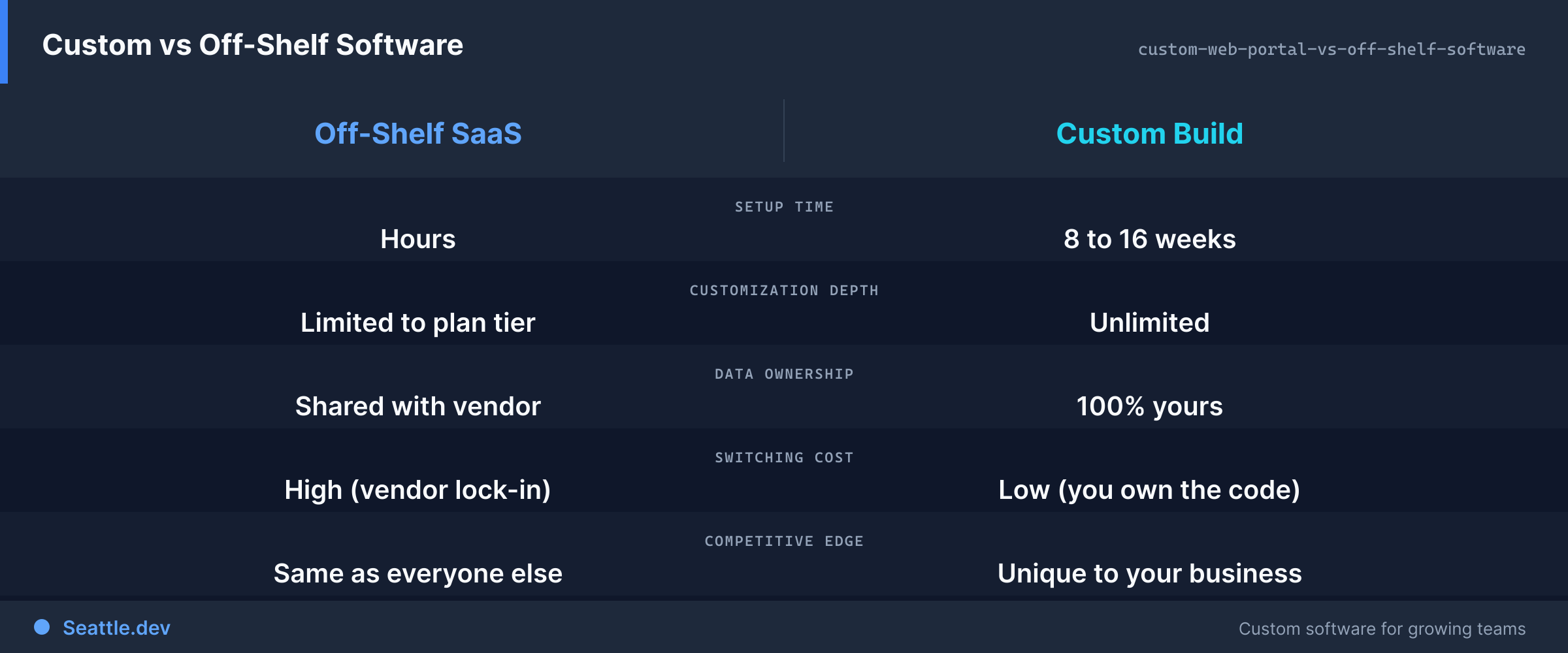
Data hostage situations. Switching away from commercial software later becomes complicated. Your business data lives in their system, often in formats that don't export cleanly. Moving to different software—whether another commercial product or a custom solution—requires data migration that can be difficult, expensive, or incomplete. This lock-in means you're effectively committed to the platform even if it becomes limiting or expensive.
When Off-the-Shelf Software Makes Perfect Sense
Despite these costs, commercial software is often the right choice. Certain situations strongly favor buying over building.
Common, well-solved problems. Some business needs are universal and well-addressed by mature commercial products. Email marketing platforms, accounting software, basic CRM systems—these categories have excellent commercial options that work well for most businesses. Unless you have truly unique requirements, custom development doesn't provide meaningful advantages for these commoditized capabilities.
Rapid deployment is critical. Commercial software can be operational in days or weeks. Custom development takes months. If you need a solution immediately to solve an urgent business problem, commercial software provides value quickly while custom solutions are still being designed. Speed to value sometimes outweighs perfect fit.
Limited technical resources. Commercial software includes support, maintenance, updates, security patches, and infrastructure. You're not responsible for keeping it running. If your organization lacks technical resources or doesn't want to invest in ongoing software maintenance, commercial software transfers that responsibility to the vendor.
Uncertainty about requirements. If you're entering a new market, launching a new business model, or trying something experimental, you don't yet know what you really need. Commercial software lets you start quickly and learn what matters. Once you understand your requirements better—after months or years of operating—you're in a much better position to evaluate whether custom development would serve you better.
Standard workflows work fine. Some businesses operate in relatively standard ways. If commercial software's built-in workflows match how you work—or close enough that adapting your processes makes sense—the value of custom development is limited. Don't pay for customization if standardization serves your needs well enough.
When Custom Development Delivers Clear Value
Other situations favor custom solutions that fit your specific business precisely.
Competitive differentiation depends on process. If how you operate differently from competitors is a key business advantage, generic software limits your differentiation. Custom portals let you implement unique workflows that match your operational advantages. The software becomes an asset that enables and protects your competitive position rather than forcing you toward industry-standard processes.
Complexity doesn't fit standard patterns. Some businesses have genuinely complex requirements that don't map to commercial software's assumptions. Multiple business entities with different rules. Complex approval workflows that vary by situation. Unusual data relationships that standard databases don't accommodate. Trying to force these scenarios into commercial software creates more problems than it solves.
Long-term cost justification is clear. If subscription costs for commercial software are substantial and ongoing, custom development often pays for itself over time. A $200,000 custom portal that replaces $4,000/month in subscription fees breaks even in four years—then continues providing value without recurring costs. Many businesses use software for five, ten, or twenty years. Long time horizons favor custom development economically.
Integration is the primary requirement. Sometimes you don't need a full application—you need your existing systems to work together better. Custom development shines here because you're building exactly the connections and workflow orchestration you need rather than trying to integrate commercial software with your existing stack. Custom integration infrastructure serves your specific architecture.
Control and flexibility matter. Custom software means you control the roadmap. Features get added when you need them, not when a vendor's product management decides. Workflows change when your business changes, not when a major version update happens. You decide what data to track, how to structure it, and how long to retain it. This control is valuable when your business has specific requirements or changes frequently.
Data sensitivity or compliance requirements. Some businesses handle data with regulatory, competitive, or privacy requirements that commercial software can't fully accommodate. Custom solutions let you implement exactly the security controls, audit trails, data retention policies, and compliance measures your situation requires. You control where data lives, who can access it, and how it's protected.
The Hybrid Approach: Custom Integration Layer
Sometimes the best answer isn't choosing between commercial software and custom development—it's combining them strategically.
Use commercial software for standardized capabilities where excellent products exist. Let established platforms handle email, accounting, CRM, or other well-solved problems. Then build custom integration infrastructure and workflow orchestration that connects these commercial products and adds your specific business logic.
This hybrid approach captures commercial software's advantages—mature products, vendor support, regular updates—while adding custom capabilities that fit your specific needs. You're not building everything from scratch; you're building the connective tissue and custom features that off-the-shelf products don't provide.
A custom web portal might serve as the unified interface your team uses daily, while behind the scenes it orchestrates commercial systems. Data flows between your commercial accounting software, commercial CRM, and commercial communication tools through custom integration logic. Your team sees workflows designed for exactly how your business operates, even though many components come from commercial products.
This approach often delivers the best cost-benefit ratio. You avoid custom development of commodity capabilities while gaining the customization and control that matters for your specific operations. Implementation is faster than building everything custom and more tailored than relying solely on commercial software.
Making the Decision: A Practical Framework
When facing the build-versus-buy decision, evaluate systematically rather than based on intuition or anecdotes.
Calculate true total cost of ownership. For commercial software, include subscription fees, integration costs, configuration time, user training, ongoing workaround maintenance, and expected future price increases. For custom development, include initial build cost, hosting infrastructure, maintenance, and future enhancements. Compare these total costs over a realistic time horizon—typically three to five years.
Identify deal-breaker requirements. What capabilities are absolutely necessary for your business to operate effectively? If commercial software can't meet these requirements without painful workarounds, custom development moves up in priority. If commercial software handles all must-have requirements well, the case for custom development weakens.
Evaluate strategic importance. How central is this software to your competitive advantage? If it's a key differentiator, lean toward custom development that can evolve with your business strategy. If it's a necessary but generic capability, commercial software is probably fine.
Consider your technical capacity. Do you have or can you build relationships with developers who can maintain custom software long-term? Custom development requires ongoing maintenance, updates, and enhancement. If you lack technical resources or partnerships, this creates risk.
Assess future flexibility needs. How often do your requirements change? If workflows, data structures, and processes evolve frequently, custom development that you control may serve you better than commercial software where changes require vendor cooperation or major configuration work.
Factor in integration complexity. How many systems need to connect? If you're integrating five or six different platforms, custom integration infrastructure might provide more value than trying to chain together various commercial integration tools. If integration needs are minimal, this matters less.
Starting Your Software Decision Process
Begin by deeply understanding your actual requirements rather than jumping to solutions.
Document your current workflows completely, including not just the main path but exceptions, edge cases, and workarounds. Understanding what you actually do reveals what you actually need, which is often different from what you think you need.
Involve the people who will use the software daily. They understand the practical details, pain points, and necessary features that managers might miss. Their insights prevent building or buying software that looks good in demonstrations but fails in real use.
Explore commercial options thoroughly before committing to custom development. You might find products that fit better than expected. Even if you ultimately choose custom development, understanding what commercial products offer informs better design.
Get cost estimates for both paths. Talk to software vendors about total cost including integrations and addons. Consult with developers about custom build costs. Realistic numbers make comparison possible rather than choosing based on assumptions.
Ready to figure out whether custom development or commercial software better serves your business? We help Seattle companies evaluate their options and make practical decisions based on real requirements and total costs. Schedule a consultation to discuss your specific situation. We'll help you understand what approach truly fits your needs—whether that's custom development, commercial software, or a hybrid combination—and create a practical path forward that serves your business rather than creating regret.