Custom DevelopmentTim Mushen

The Complete Guide to Building Client Portals That Your Customers Will Actually Use

Learn how to design and build client portal software that drives user adoption. Discover essential features, security best practices, and proven strategies for successful customer portals.
client portal developmentcustomer portal softwareB2B portal solutionsuser experienceportal design
The Complete Guide to Building Client Portals That Your Customers Will Actually Use

The Complete Guide to Building Client Portals That Your Customers Will Actually Use

The truth about client portals is uncomfortable: most of them fail spectacularly. Companies invest tens of thousands of dollars building beautiful interfaces packed with features, launch with fanfare, and then watch as adoption rates hover around 15%. Clients still call with questions answered on the portal. They still email for documents available for download. They still ask for information displayed prominently on their dashboard.

The problem isn't that clients are difficult or resistant to change. The problem is that most portals are built to solve the company's problems, not the client's problems. They're designed around organizational structure instead of client workflows. They prioritize what the company wants clients to do rather than what clients actually need to accomplish.

Building a client portal that people genuinely want to use requires a fundamental shift in perspective. This guide will show you how to create portals that become indispensable tools clients check daily, not digital filing cabinets they reluctantly visit when forced.

Understanding What Clients Actually Need

Before writing a single line of code, you need to answer one critical question: what are your clients trying to accomplish, and how does the portal make that easier?

The answer is never "access information" in the abstract. Clients have specific goals. A marketing agency's clients want to approve campaigns, review performance, and understand ROI without sitting through hour-long status meetings. A financial advisor's clients want to see their portfolio performance, understand investment strategy, and feel confident in their financial future without deciphering complex spreadsheets. A SaaS company's clients want to manage their subscription, get quick answers to questions, and feel in control of their account.

Start by mapping the actual workflows and pain points. What tasks do clients currently handle via email, phone calls, or in-person meetings? What information do they ask for repeatedly? What decisions do they need to make, and what information drives those decisions? What frustrates them about the current process?

This discovery phase determines success or failure. Skip it, and you'll build a portal that technically works but practically fails. Invest time here, and you'll uncover insights that shape every feature decision going forward.

The Five Essential Features Every Client Portal Needs

Regardless of industry, successful client portals share common foundational features. Miss any of these, and adoption suffers.

Secure authentication that actually works. Your portal security needs to be bulletproof, but the authentication experience needs to be frictionless. Multi-factor authentication is non-negotiable for sensitive data, but implement it smartly. Use email magic links for occasional users who'll forget passwords. Offer biometric authentication for mobile users. Allow SSO integration for enterprise clients. The goal is security without friction—never compromise on either.

Document management clients can actually navigate. Every portal needs document sharing, but most implement it poorly. Clients don't think in terms of folder structures mirroring your internal organization. They think in terms of "I need last quarter's report" or "show me all contracts." Implement smart search, tag documents by type and date, enable filtering by relevance to the client. Provide document previews so clients don't need to download files just to see if they found the right one. Track version history so clients know they're looking at current information.

Communication that keeps context. Email chains lose context, phone calls lack documentation, and scattered communication creates confusion. Your portal needs built-in messaging that maintains context around projects, documents, or specific issues. Clients should be able to click on a project and see all communication related to it. Your team should be able to respond without switching tools. Notifications should be smart—urgent issues get immediate alerts, routine updates get daily digests, and clients control their notification preferences.

Activity transparency that builds trust. Clients want to know what's happening without needing to ask. Implement activity feeds showing recent updates, progress on projects, upcoming deadlines, and completed milestones. Make status clear and actionable. Instead of "processing" show "we're reviewing your documents—expect a response by Friday." Instead of generic "completed" show specific accomplishments and next steps. Transparency reduces anxiety and eliminates unnecessary status-check calls.

Self-service actions that empower clients. The most successful portals don't just display information—they enable action. Clients should be able to update their account information, make payments, download invoices, schedule meetings, approve deliverables, and request changes without emailing or calling. Every self-service action you enable saves time for everyone and gives clients more control. Start with the most common requests and progressively add more functionality.

Mobile-First Design That Clients Actually Use

Here's a startling statistic: 60% of client portal access happens on mobile devices, but most portals are clearly designed for desktop and grudgingly adapted for mobile. This backwards approach guarantees poor user experience and low adoption.

Mobile-first design means considering the mobile experience from the start, not as an afterthought. Your clients are checking the portal while commuting, between meetings, waiting for coffee, or at home on the couch. The mobile experience needs to be just as capable as desktop, not a stripped-down version.

Priority information should be immediately visible without scrolling. Common actions should be reachable with one thumb. Forms should be short and use appropriate mobile input types. Large touch targets prevent mis-taps. Smart defaults reduce typing. File uploads should work seamlessly with phone cameras. Navigation should be simple and obvious.

Critically, the mobile experience should be a progressive web app, not a separate native app. Building separate iOS and Android apps triples development cost and maintenance burden. Modern PWAs installed to the home screen feel native, work offline, and provide a consistent experience across all devices—all from a single codebase.

Security and Access Control Without Complexity

Client portals handle sensitive information, making security paramount. But security that frustrates users gets circumvented—clients email sensitive documents instead, destroying the security you worked so hard to implement.

The foundation is role-based access control that matches real-world relationships. A client should only see their information, not other clients' data. Within an organization, different users might have different permissions—executives see financial data, operational staff see project details, and external partners see limited information. These permission levels should be flexible and granular without requiring a PhD to configure.

Implement automatic session timeouts for sensitive data, but remember session state so clients don't lose work. Log all access and actions for audit trails without making clients feel surveilled. Encrypt sensitive data both in transit and at rest. Implement rate limiting to prevent brute force attacks without blocking legitimate use.

For highly sensitive information, consider time-limited access links that expire after viewing or after a set time period. This prevents forwarded links from becoming permanent security holes while still allowing convenient sharing.

Avoiding the Common Pitfalls That Kill Adoption

Even well-designed portals can fail due to avoidable mistakes. Learn from others' experiences and sidestep these traps.

The training requirement trap. If your portal requires extensive training, it's too complex. Clients won't attend training sessions for a tool they use occasionally. The interface needs to be intuitive enough that first-time users can accomplish basic tasks immediately, with progressive disclosure revealing advanced features as needed. Implement contextual help and tooltips rather than separate documentation.

The notification overload trap. Over-communicating is as bad as under-communicating. Every notification should be relevant and actionable. Give clients granular control over notification preferences. Default to less notification, not more. Allow clients to customize what triggers emails, what shows as in-app notifications, and what gets included in digests. Respect "do not disturb" hours.

The feature bloat trap. The temptation is to add features continuously. Resist it. Every feature adds complexity and maintenance burden. Focus relentlessly on the core workflows that deliver the most value. It's better to do five things excellently than twenty things poorly. If clients aren't using a feature after six months, remove it rather than carrying the maintenance burden.

The data staleness trap. Nothing destroys trust faster than outdated information. If your portal displays stale data, clients stop trusting it and resort to calling for "real" information. Implement clear data freshness indicators—show when information was last updated. Automate data syncing where possible. Make refresh actions obvious when manual updates are needed. Never display potentially outdated information without clear timestamps.

The migration laziness trap. Launching a portal while maintaining old processes guarantees failure. If clients can still email for everything they could do in the portal, they'll keep emailing. Successful portal launches require process changes. Train your team to direct clients to the portal for routine requests. Update contracts and communications to reference portal functionality. Make the portal the path of least resistance, not an optional alternative.

The Launch Strategy That Drives Adoption

How you launch matters as much as what you launch. A big-bang launch where you suddenly expect all clients to switch to a new system overnight typically fails. Successful portal launches follow a more measured approach.

Start with a closed beta using your most engaged, tech-savvy clients. Gather detailed feedback and iterate quickly. These early adopters become champions who provide testimonials and peer recommendations that convince hesitant clients later.

Create tiered rollout groups. Invite clients in waves, which allows you to provide personalized onboarding attention and manage support load. Each wave learns from previous waves' feedback, creating a progressively better experience.

Develop activation campaigns that show value immediately. Send personalized onboarding emails highlighting features relevant to each client's specific needs. Offer quick win actions they can accomplish in their first login. Provide video walkthroughs for visual learners. Schedule brief live demos for clients who prefer personal guidance.

Measure activation metrics obsessively. Track not just login rates but meaningful engagement—clients who complete key actions, return for second sessions, and use the portal for their intended workflows. Identify clients who created accounts but never engaged, and reach out personally to understand barriers.

Measuring Success Beyond Login Metrics

Vanity metrics like total registered users or monthly logins don't indicate success. Focus on metrics that measure genuine value delivery.

Task completion rate measures whether clients successfully accomplish what they came to do. If clients log in but can't figure out how to find documents or update information, high login counts hide low utility. Track completion rates for key workflows and optimize the ones with poor performance.

Support ticket deflection quantifies how much the portal reduces support burden. Measure ticket volume for issues the portal should handle. If clients still email questions answered in the portal, either the information isn't easy to find or clients don't trust the portal's accuracy. Both problems need fixing.

Time to value measures how quickly clients accomplish goals. If finding a document takes six clicks and two minutes, there's room for improvement. Optimize workflows to reduce friction. Every unnecessary click is an opportunity for clients to give up and call instead.

Feature adoption reveals which capabilities deliver value and which gather dust. If you built invoice management but clients still call for billing information, investigate why. Maybe they can't find the feature, don't understand it, or it doesn't match their workflow expectations.

Client satisfaction and NPS tied specifically to portal experience separate overall client satisfaction from portal utility. Regularly survey portal users about their experience. The insights reveal priorities for improvement better than usage analytics alone.

Building for Evolution, Not Just Launch

The most successful client portals evolve continuously based on real usage and feedback. Plan from day one for this evolution.

Build analytics into every feature to understand usage patterns. Where do clients spend time? Where do they get stuck? What features get ignored? Let data guide enhancement priorities.

Implement feedback mechanisms directly in the portal. Make it trivially easy for clients to report issues, request features, or ask questions without leaving the interface. This feedback is gold—it tells you exactly what real users need.

Plan for API integrations with the tools clients already use. If your clients live in Salesforce, can portal information flow there? If they use Slack for team communication, can portal notifications appear there? Meeting clients where they already work multiplies portal value.

Consider white-labeling capabilities if you serve enterprise clients. Large organizations want portals that match their branding and feel like native tools, not obvious third-party interfaces. The flexibility to customize branding, domain, and key interface elements significantly increases enterprise adoption.

The Development Approach That Delivers Results

Technical implementation choices dramatically impact long-term success. Cutting corners during development creates technical debt that eventually demands repayment with interest.

Choose proven frameworks and technologies. Modern JavaScript frameworks like React, Vue, or Next.js provide solid foundations with large ecosystems and extensive resources. Don't chase the newest, trendiest technologies for production client portals—bet on proven platforms with long-term support.

Implement proper authentication and authorization from the start. Trying to bolt security onto an existing application is expensive and risky. Use established authentication libraries and patterns rather than rolling your own. Compliance requirements (GDPR, HIPAA, SOC 2) are easier to satisfy when baked into architecture from the beginning.

Design APIs that can grow with evolving requirements. Clean API architecture allows you to add features, connect new systems, and build mobile apps without rearchitecting core systems. Invest in proper API documentation even if you're the only consumer initially—future you will be grateful.

Plan for scale even if current usage is modest. Client portals that succeed grow quickly, and scaling problems surface suddenly. Choose database designs and hosting architectures that scale gracefully. The cost difference between hosting that handles 100 users and hosting that handles 10,000 users is smaller than the cost of emergency rearchitecting under pressure.

Taking the First Step

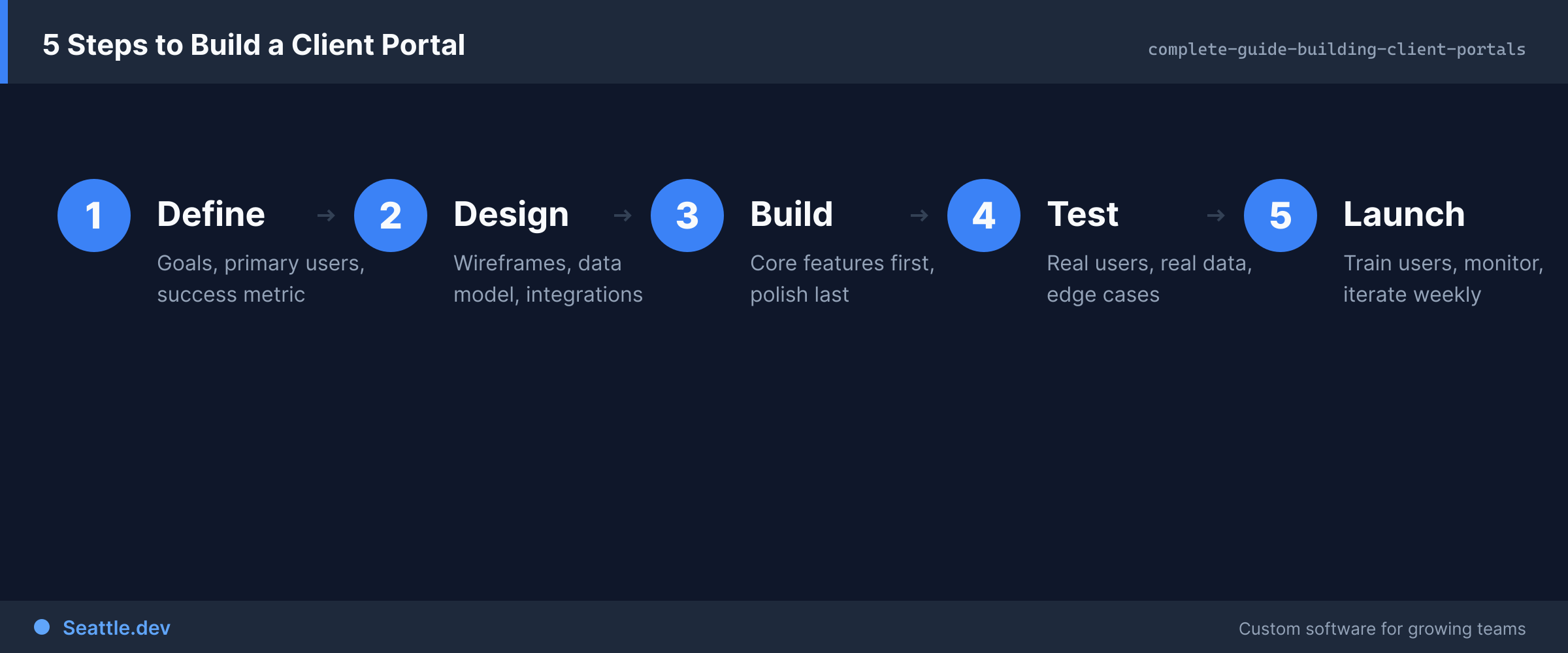
Building a client portal that clients actually use isn't about fancy features or cutting-edge technology. It's about deeply understanding client needs, designing workflows that make their lives easier, implementing with attention to both security and experience, and continuously evolving based on real usage.

The investment pays dividends for years. Clients who engage with your portal feel more connected to your business, require less support, and stay longer. Your team spends less time on routine requests and more time delivering value. Operations become more efficient when information flows digitally instead of through email threads and phone calls.

Ready to build a client portal that becomes a competitive advantage rather than an underutilized expense? Schedule a consultation to discuss your specific needs, client workflows, and how a custom portal can transform your client relationships. We'll help you understand what's possible, realistic timelines, and how to ensure your portal investment delivers returns from day one.

Ready to Start Your Project?

Let's discuss how we can help bring your ideas to life

Schedule a Free Consultation
Bandmate Footer Background
Seattle.dev Logo

Custom web development and design for Seattle businesses. We specialize in API integration, custom web portals, and business automation.